Build a Columnar Storage Engine with SSTable and Compaction
databases performance data-engineering
System Design Deep Dive
Columnar Storage Engine with SSTable
When every write is a sequential append and every read is a merge sort - the beautiful tension at the heart of LSM trees.
Imagine you need to ingest 500,000 writes per second into a storage engine. Your P99 write latency must stay under 2ms. Traditional B-tree storage engines - the kind powering PostgreSQL and MySQL - achieve this by performing random I/O: for every write, they find the exact page on disk, read it, modify it, and write it back. At 500k writes/second, that’s 500k random disk seeks per second. Even on NVMe SSDs capable of 500k IOPS, you’re already at the physical limit, with zero headroom for reads, compaction, or replication.
The insight behind the Log-Structured Merge-tree (LSM tree) is deceptively simple: never write to the middle of a file. Turn all writes into sequential appends. Sequential disk I/O on modern hardware is 10x to 100x faster than random I/O - a 7200 RPM HDD can handle 150 sequential MB/s but only 150 random seeks/second. By batching writes in memory and flushing them as immutable sorted files, an LSM tree engine converts the hardest problem (random writes) into the easiest operation (sequential writes).
The tradeoff is elegant but painful: reads get harder. When you write a key multiple times, older versions scatter across multiple files at different levels. Reading that key requires checking the current memory buffer, then potentially every file on disk until you find a fresh enough version. We spend compaction I/O (merging files in the background) to reclaim read performance. The entire design philosophy is: shift I/O cost from writes (synchronous, user-facing) to compaction (asynchronous, background).
Systems like RocksDB, LevelDB, Apache Cassandra, and HBase all bet their durability and performance on this architecture. At Facebook, RocksDB processes over 100 trillion operations per day across their storage fleet. Understanding how the memtable, sstable, bloom filter, and compaction interact is foundational knowledge for anyone building at scale.
Requirements and Constraints
Functional Requirements
PUT(key, value)- write or update any key-value pairGET(key)- retrieve the latest value for a key, or signal not-foundDELETE(key)- logically delete a key using atombstonemarker- Range scans:
SCAN(start_key, end_key)- return all key-value pairs in sorted order - Atomic single-key operations (no cross-key transactions initially)
Non-Functional Requirements
- Write throughput: 100k-500k writes/second on commodity hardware
- Write P99 latency: under 5ms
- Read P99 latency: under 10ms for point lookups (bloom filter assisted)
- Durability: writes acknowledged only after WAL append (no data loss on crash)
- Storage efficiency: space amplification below 2x in steady state
- Background compaction must not starve foreground reads/writes
Design Constraints
- Data exceeds available RAM (cold storage scenario - 10TB on disk, 32GB RAM)
- Write-heavy workload: 80% writes, 20% reads (typical for time-series, logging, audit)
- Keys are arbitrary byte strings up to 4KB; values up to 1MB
- Single-node design first, sharded horizontally as a second layer
High-Level Architecture
The LSM tree organizes storage into a hierarchy of levels. Level 0 (L0) receives freshly flushed data from memory. Deeper levels contain progressively more compacted, sorted data. The key invariant: at any level below L0, no two sstable files contain overlapping key ranges.
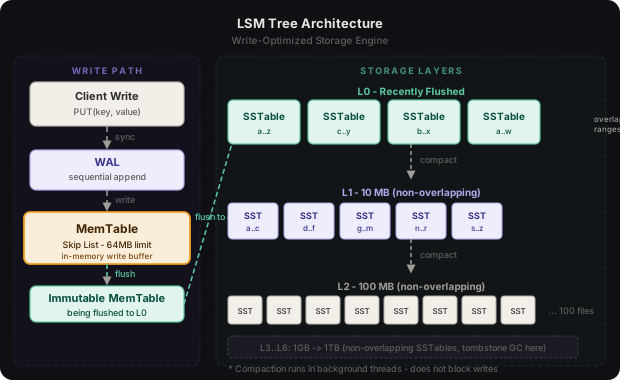
The write path is simple: every write appends to an in-memory memtable (and a write-ahead log for durability). When the memtable reaches a size threshold (typically 64MB), it becomes immutable and gets flushed as a new L0 sstable. Background compaction threads continuously merge L0 files into L1, then L1 into L2, maintaining sorted order at each step.
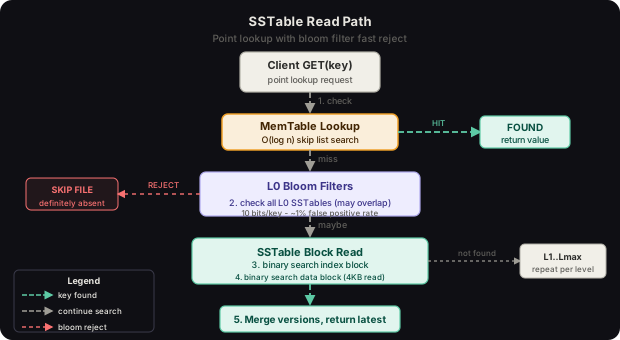
The read path is more complex: we check the active memtable first, then any immutable memtables being flushed, then every level from L0 to Ln, consulting bloom filters to skip files that definitely don’t contain the key, and doing binary search into index blocks of files that might.
Key Insight
LSM trees make a deliberate tradeoff: write amplification (each byte written multiple times during compaction) in exchange for write speed (all writes are sequential). The compaction strategy you choose determines exactly where on the write-amplification vs read-amplification vs space-amplification triangle you sit.
The MemTable Write Buffer
The MemTable is the heart of the write path. It’s an in-memory ordered data structure - typically a Red-Black tree or a skip list - that accepts all incoming writes and maintains them in sorted key order. Sorted order is essential because when we flush the memtable to disk, we need to emit key-value pairs in sorted sequence to produce a valid sstable.
Red-Black Tree vs Skip List
Both structures support O(log n) insert, delete, and lookup. The choice comes down to concurrency characteristics. Red-Black trees require exclusive locking during rebalancing rotations. Skip lists can be made lock-free using compare-and-swap operations on individual node pointers, enabling higher concurrent write throughput. RocksDB defaults to a skip list memtable; it also supports a HashSkipList variant for pure point-lookup workloads.
import sortedcontainers
import threading
from dataclasses import dataclass
from typing import Optional
import time

TOMBSTONE = b'\x00TOMBSTONE\x00'

@dataclass
class MemTableEntry:
    key: bytes
    value: bytes  # TOMBSTONE sentinel for deletes
    sequence: int  # monotonically increasing write sequence number

class MemTable:
    def __init__(self, size_limit_bytes: int = 64 * 1024 * 1024):
        # SortedDict provides O(log n) ops with sorted iteration
        self._data: dict[bytes, MemTableEntry] = {}
        self._sorted_keys: list[bytes] = []
        self._lock = threading.RWLock() if hasattr(threading, 'RWLock') else threading.Lock()
        self._size_bytes = 0
        self._size_limit = size_limit_bytes
        self._sequence = 0

    def put(self, key: bytes, value: bytes) -> bool:
        """Returns True if memtable is now full and should be flushed."""
        with self._lock:
            self._sequence += 1
            entry = MemTableEntry(key=key, value=value, sequence=self._sequence)
            old = self._data.get(key)
            if old is None:
                self._size_bytes += len(key) + len(value) + 16  # overhead
                # insert into sorted position
                import bisect
                bisect.insort(self._sorted_keys, key)
            else:
                self._size_bytes += len(value) - len(old.value)
            self._data[key] = entry
            return self._size_bytes >= self._size_limit

    def delete(self, key: bytes) -> bool:
        return self.put(key, TOMBSTONE)

    def get(self, key: bytes) -> Optional[bytes]:
        entry = self._data.get(key)
        if entry is None:
            return None
        if entry.value == TOMBSTONE:
            return None  # key was deleted
        return entry.value

    def scan(self, start_key: bytes, end_key: bytes):
        """Yield (key, value) pairs in sorted order within range."""
        import bisect
        lo = bisect.bisect_left(self._sorted_keys, start_key)
        hi = bisect.bisect_right(self._sorted_keys, end_key)
        for key in self._sorted_keys[lo:hi]:
            entry = self._data[key]
            if entry.value != TOMBSTONE:
                yield key, entry.value

    def flush_iterator(self):
        """Yield all entries in sorted key order for SSTable flush."""
        for key in self._sorted_keys:
            yield key, self._data[key]

    @property
    def size_bytes(self) -> int:
        return self._size_bytes
Write-Ahead Log (WAL)
Before any write touches the memtable, it must be appended to the Write-Ahead Log - a sequential append-only file on disk. If the process crashes before the memtable is flushed, we replay the WAL to reconstruct the memtable on restart. This is the only synchronous disk write in the hot path, and it’s sequential, so it’s fast.
import struct
import os
import zlib

class WAL:
    """Write-Ahead Log: append-only sequential file for crash recovery."""

    RECORD_HEADER_FMT = '>IIQ'  # crc32, length, sequence_number
    RECORD_HEADER_SIZE = struct.calcsize(RECORD_HEADER_FMT)

    def __init__(self, path: str):
        self._path = path
        self._fd = open(path, 'ab', buffering=0)  # unbuffered for durability

    def append(self, key: bytes, value: bytes, sequence: int) -> None:
        payload = struct.pack('>H', len(key)) + key + struct.pack('>I', len(value)) + value
        crc = zlib.crc32(payload) & 0xFFFFFFFF
        header = struct.pack(self.RECORD_HEADER_FMT, crc, len(payload), sequence)
        record = header + payload
        self._fd.write(record)
        self._fd.flush()  # fsync for true durability (or use O_DSYNC)
        os.fsync(self._fd.fileno())

    def replay(self):
        """Replay WAL records for crash recovery."""
        with open(self._path, 'rb') as f:
            while True:
                header_bytes = f.read(self.RECORD_HEADER_SIZE)
                if len(header_bytes) < self.RECORD_HEADER_SIZE:
                    break
                crc, length, sequence = struct.unpack(self.RECORD_HEADER_FMT, header_bytes)
                payload = f.read(length)
                if zlib.crc32(payload) & 0xFFFFFFFF != crc:
                    break  # truncated or corrupt record - stop here
                key_len = struct.unpack('>H', payload[:2])[0]
                key = payload[2:2+key_len]
                val_len = struct.unpack('>I', payload[2+key_len:6+key_len])[0]
                value = payload[6+key_len:6+key_len+val_len]
                yield sequence, key, value
Flush Triggers
The memtable flush is triggered when any of these conditions are met:
- Size threshold:
memtablereaches the configured limit (default 64MB in RocksDB) - Time threshold: a write-idle timeout (prevents data sitting in memory too long)
- WAL size threshold: the
WALfile grows beyond a limit, preventing unbounded log replay time on restart
When flush triggers, the active memtable becomes immutable - it accepts no new writes but can still serve reads. A new empty memtable is created immediately so writes continue without pausing. The immutable memtable is flushed to disk by a background thread, producing a new L0 sstable.
Key Insight
The immutable memtable pattern is critical for low write latency. Writes never wait for disk I/O. The switch from active to immutable is a single atomic pointer swap taking nanoseconds. Meanwhile the background flush proceeds at disk speed without blocking writers.
The SSTable Format
A Sorted String Table (SSTable) is an immutable, sorted, on-disk file containing a sequence of key-value pairs. “Immutable” is the key word: once written, an sstable is never modified. Updates and deletes produce new entries at higher levels. This immutability makes sstable files trivially safe to read concurrently with zero locking.
File Structure
An sstable file is divided into blocks. The layout from start to finish:
+------------------+
| Data Block 0     |  4KB - 64KB of sorted key-value entries
+------------------+
| Data Block 1     |
+------------------+
| ...              |
+------------------+
| Data Block N     |
+------------------+
| Filter Block     |  Bloom filter bit array(s), one per data block
+------------------+
| Filter Index     |  Offsets into Filter Block per block range
+------------------+
| Index Block      |  One entry per data block: last_key, offset, size
+------------------+
| Meta Index Block |  Offsets of Filter Block and Filter Index
+------------------+
| Footer           |  Fixed 48 bytes: magic number, meta index offset+size
+------------------+
Each data block stores entries in prefix-compressed format. Instead of storing every key in full, we store a full key at regular intervals (every 16 entries by default) called a restart point, then delta-encode subsequent keys against the previous restart point’s key. For time-series keys like metrics:cpu:host-001:1717200000, common prefixes compress dramatically.
import struct
from typing import Iterator

class DataBlockBuilder:
    """Builds a single data block with prefix compression."""

    RESTART_INTERVAL = 16  # store full key every N entries

    def __init__(self):
        self._entries: list[tuple[bytes, bytes]] = []
        self._restarts: list[int] = []
        self._current_size = 0

    def add(self, key: bytes, value: bytes) -> None:
        assert not self._entries or key > self._entries[-1][0], "Keys must be sorted"
        self._entries.append((key, value))

    def finish(self) -> bytes:
        buf = bytearray()
        prev_key = b''

        for i, (key, value) in enumerate(self._entries):
            if i % self.RESTART_INTERVAL == 0:
                self._restarts.append(len(buf))
                shared = 0
            else:
                # compute shared prefix length
                shared = 0
                for a, b in zip(prev_key, key):
                    if a == b:
                        shared += 1
                    else:
                        break

            non_shared = key[shared:]
            # encode: shared_len(varint) | non_shared_len(varint) | value_len(varint) | non_shared | value
            buf += _encode_varint(shared)
            buf += _encode_varint(len(non_shared))
            buf += _encode_varint(len(value))
            buf += non_shared
            buf += value
            prev_key = key

        # append restart array
        for r in self._restarts:
            buf += struct.pack('<I', r)
        buf += struct.pack('<I', len(self._restarts))

        return bytes(buf)


def _encode_varint(n: int) -> bytes:
    """Encode unsigned integer as variable-length encoding."""
    out = bytearray()
    while n > 0x7F:
        out.append((n & 0x7F) | 0x80)
        n >>= 7
    out.append(n)
    return bytes(out)
Index Block
The index block is the sstable’s table of contents. For each data block, it stores:
- The separator key (shortest key that is greater than or equal to the last key of this block and less than or equal to the first key of next block)
- The byte offset of the data block within the file
- The size of the data block in bytes
For a point lookup, we binary search the index block to find which data block might contain our key, then binary search within that data block. This means we need at most 2 binary searches and 1 disk read (the data block) to find any key.
Footer
The fixed-size 48-byte footer at the very end of the file contains:
- Offset and size of the meta index block (which points to filter block, etc.)
- A 8-byte magic number (
0xdb4775248b80fb57in LevelDB) for format verification
Real System
LevelDB’s SSTable format, defined in table/format.h, uses a 48-byte footer with two BlockHandle structs (each 10-20 bytes) pointing to the metaindex block. RocksDB extends this format with a version byte and checksum type field, enabling per-block checksums using xxhash or CRC32C instead of the whole-file CRC approach LevelDB uses.
Bloom Filters per SSTable
Bloom filters solve the most expensive case in LSM tree reads: checking an sstable that definitely doesn’t contain the key. Without bloom filters, every read for a missing key must perform a binary search into every sstable across every level - that’s O(L * files_per_level) disk reads for a single point lookup.
A bloom filter is a probabilistic data structure that answers “is this element in the set?” with two possible answers: “definitely not” (100% accurate) or “probably yes” (with a configurable false positive rate). It never produces false negatives.
Bit Array and Hash Functions
A bloom filter is a bit array of m bits, initially all zeros. To insert a key, we compute k independent hash values (each in range [0, m)), and set those k bits to 1. To query a key, we compute the same k hash values and check if all k bits are 1. If any bit is 0, the key is definitely absent.
import math
import mmh3  # MurmurHash3 - fast, good distribution
from bitarray import bitarray

class BloomFilter:
    """Bloom filter for SSTable key set membership."""

    def __init__(self, expected_items: int, false_positive_rate: float = 0.01):
        # optimal bit array size: m = -n * ln(p) / (ln(2)^2)
        self.m = math.ceil(
            -expected_items * math.log(false_positive_rate) / (math.log(2) ** 2)
        )
        # optimal hash function count: k = (m/n) * ln(2)
        self.k = max(1, round((self.m / expected_items) * math.log(2)))
        self._bits = bitarray(self.m)
        self._bits.setall(0)

    def add(self, key: bytes) -> None:
        for i in range(self.k):
            # use different seeds for each of k hash functions
            index = mmh3.hash(key, seed=i, signed=False) % self.m
            self._bits[index] = 1

    def may_contain(self, key: bytes) -> bool:
        """Returns False if key is definitely absent. True means maybe present."""
        for i in range(self.k):
            index = mmh3.hash(key, seed=i, signed=False) % self.m
            if not self._bits[index]:
                return False
        return True

    def to_bytes(self) -> bytes:
        return self._bits.tobytes()

    @classmethod
    def from_bytes(cls, data: bytes, m: int, k: int) -> 'BloomFilter':
        bf = cls.__new__(cls)
        bf.m = m
        bf.k = k
        bf._bits = bitarray()
        bf._bits.frombytes(data)
        bf._bits = bf._bits[:m]  # trim padding bits
        return bf

    @property
    def bits_per_key(self) -> float:
        return self.m / (self.m / (self.k / math.log(2)))
False Positive Rate and Sizing
For 10 bits per key, a bloom filter achieves approximately 1% false positive rate with k=7 hash functions. For 6 bits per key, false positives climb to ~5%. RocksDB’s default is 10 bits per key. At 1 billion keys and 10 bits/key, the filter is 10 billion bits = 1.25 GB - small enough to keep in memory or in the OS page cache.
| Bits per key | False positive rate | Hash count (k) |
|---|---|---|
| 6 | 5.7% | 4 |
| 8 | 2.2% | 6 |
| 10 | 0.82% | 7 |
| 12 | 0.31% | 8 |
| 16 | 0.046% | 11 |
Key Insight
Bloom filters are stored per-SSTable and loaded into the block cache on first access. For a read workload with many point lookups, the bloom filter hit rate directly determines read amplification. If every filter says “maybe yes,” you’re doing full file lookups. If 99% say “definitely no,” you skip 99% of files. This is why tuning the bits-per-key parameter has such outsized impact on read performance.
Partitioned Bloom Filters (RocksDB v6+)
In RocksDB 6.0+, the default changed to partitioned bloom filters. Instead of one monolithic bit array per sstable, the filter is divided into partitions aligned to data blocks. This improves cache locality: when you access the filter partition for a specific key range, you only load the few KB of filter bits relevant to that block, not the entire 1.25GB filter.
Compaction Strategies
Compaction is the background process that merges multiple sstable files into fewer, larger files. It has three jobs: reclaim space from overwritten/deleted values, maintain sorted key order within levels, and bound the read amplification by keeping the number of files in each level under control.
The fundamental tension in compaction design is the write-read-space amplification triangle:
- Write amplification: how many times each byte is written to disk (each compaction rewrites data)
- Read amplification: how many files must be consulted for a single read
- Space amplification: ratio of bytes on disk to bytes of actual live data
Every compaction strategy makes a different point on this triangle.
Size-Tiered Compaction (STCS)
Used by Apache Cassandra by default. The idea: when you accumulate N sstable files of similar size (within a 2x factor of each other), merge them into one larger file. This creates natural size tiers: many small files at the bottom, fewer large files at the top.
- Write amplification: low - data is only rewritten when size tiers collapse
- Space amplification: high - you can temporarily have 2x live data during compaction (old files + new file coexist until merge completes)
- Read amplification: moderate - reads must check many files per tier
STCS works well for write-heavy, append-only workloads where overwrites are rare. It struggles with time-series data that has few updates but lots of range scans, because related time ranges scatter across differently-sized files.
from typing import List

def size_tiered_pick_compaction(sstables: List['SSTable'],
                                 min_threshold: int = 4,
                                 max_threshold: int = 10,
                                 size_ratio: float = 2.0) -> List['SSTable']:
    """
    Pick a set of similarly-sized SSTables to compact.
    Returns the compaction candidates or empty list if no compaction needed.
    """
    if len(sstables) < min_threshold:
        return []

    # sort by size ascending
    sorted_tables = sorted(sstables, key=lambda s: s.size_bytes)

    # find a bucket of similar-sized tables
    for i in range(len(sorted_tables) - min_threshold + 1):
        bucket = [sorted_tables[i]]
        for j in range(i + 1, len(sorted_tables)):
            ratio = sorted_tables[j].size_bytes / sorted_tables[i].size_bytes
            if ratio <= size_ratio:
                bucket.append(sorted_tables[j])
            else:
                break
        if len(bucket) >= min_threshold:
            return bucket[:max_threshold]

    return []
Leveled Compaction (LCS)
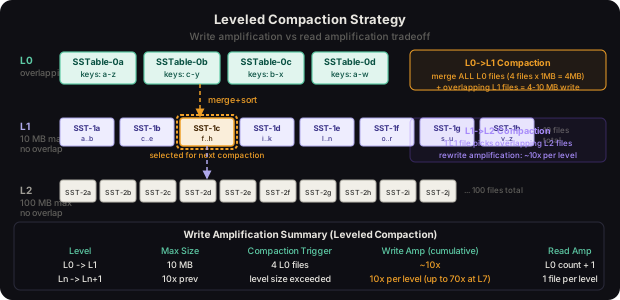
Used by LevelDB, RocksDB, and Cassandra’s LCS mode. The invariant: each level has a fixed max total size (typically 10x the previous level), and within each level below L0, no two sstable files have overlapping key ranges.
- L0: 4
sstablefiles max (all key ranges can overlap here) - L1: 10 MB total (10 non-overlapping files of 1 MB each)
- L2: 100 MB total (100 non-overlapping files of 1 MB each)
- L3: 1 GB, L4: 10 GB, and so on
When a level exceeds its size budget, a compaction job picks one sstable from that level, finds all overlapping sstable files in the next level (because no overlaps exist within Ln+1, this is a compact set), merges them all into new sorted sstable files, and places the results in Ln+1.
def leveled_pick_compaction(levels: List[List['SSTable']],
                             level_max_bytes: List[int]) -> tuple[int, List['SSTable']]:
    """
    Pick the level and sstables to compact next.
    Returns (source_level, sstables_to_compact).
    """
    # L0 is special: compact when file count exceeds threshold
    L0_THRESHOLD = 4
    if len(levels[0]) >= L0_THRESHOLD:
        # compact all L0 files + overlapping L1 files
        l0_files = levels[0]
        if len(levels) > 1:
            # find key range of all L0 files
            min_key = min(f.min_key for f in l0_files)
            max_key = max(f.max_key for f in l0_files)
            overlapping_l1 = [f for f in levels[1]
                              if f.min_key <= max_key and f.max_key >= min_key]
            return 0, l0_files + overlapping_l1
        return 0, l0_files

    # for L1+: check if level exceeds size budget
    for level_idx in range(1, len(levels)):
        total_size = sum(f.size_bytes for f in levels[level_idx])
        if total_size > level_max_bytes[level_idx]:
            # pick the sstable with the oldest compaction time (round-robin)
            candidate = min(levels[level_idx], key=lambda f: f.last_compacted_at)
            # find overlapping files in next level
            next_level = levels[level_idx + 1] if level_idx + 1 < len(levels) else []
            overlapping = [f for f in next_level
                          if f.min_key <= candidate.max_key and f.max_key >= candidate.min_key]
            return level_idx, [candidate] + overlapping

    return -1, []  # no compaction needed
Write amplification in leveled compaction: in the worst case, a key written once passes through all levels during compaction. For L levels and a 10x size ratio, write amplification is approximately 10 * L. With 7 levels, that’s ~70x write amplification. Each byte you write to the memtable gets written to disk about 70 times total. This is why write-heavy systems are careful about the number of levels.
Real System
RocksDB exposes CompactionStyle enum with kCompactionStyleLevel (leveled), kCompactionStyleUniversal (size-tiered variant), and kCompactionStyleFIFO (for time-series with TTL eviction). Facebook’s MyRocks storage engine for MySQL uses RocksDB’s leveled compaction and reduces write amplification to 10-30x compared to InnoDB’s 70-100x for their write-heavy social graph workloads.
FIFO Compaction
A special mode for time-series data with TTL: files are only deleted, never merged. When total size exceeds a limit, the oldest sstable files are deleted. Write amplification is 1x (never rewritten), but space amplification is unbounded until TTL kicks in.
Warning
Leveled compaction’s write amplification of 10-70x means that provisioning your storage throughput budget based on user-facing write rates alone will cause compaction stalls. A system ingesting 100 MB/s of user writes may need 700 MB/s of disk write bandwidth for compaction. Always provision for write amplification or you’ll hit compaction debt that degrades read latency irreversibly.
Data Model
The storage engine operates on raw byte keys and values, with versioning handled internally via sequence numbers. Every write operation carries a sequence number that monotonically increases across all operations. When multiple versions of a key exist (across memtable and various sstable levels), the version with the highest sequence number is the current one.
@dataclass(order=True)
class InternalKey:
    """
    Internal key format: user_key + sequence_number + value_type.
    Sorted by user_key ASC, then sequence_number DESC (newest first).
    This ensures during iteration and merges, we always see the latest
    version of each user key first.
    """
    user_key: bytes
    sequence: int
    value_type: int  # 1 = value, 0 = deletion tombstone

    def encode(self) -> bytes:
        # pack sequence (7 bytes) and type (1 byte) into 8-byte tag
        tag = (self.sequence << 8) | self.value_type
        return self.user_key + struct.pack('>Q', tag)

    @classmethod
    def decode(cls, data: bytes) -> 'InternalKey':
        user_key = data[:-8]
        tag = struct.unpack('>Q', data[-8:])[0]
        sequence = tag >> 8
        value_type = tag & 0xFF
        return cls(user_key=user_key, sequence=sequence, value_type=value_type)

    def __lt__(self, other: 'InternalKey') -> bool:
        if self.user_key != other.user_key:
            return self.user_key < other.user_key
        # higher sequence number comes first (newer versions sort before older)
        return self.sequence > other.sequence
Tombstone Handling
Tombstones are the deletion markers of the LSM tree. When you call DELETE(key), we don’t remove any data. Instead, we write a special tombstone entry - an InternalKey with value_type = 0 - to the memtable. This tombstone propagates through levels during compaction.
The tombstone lifecycle is: write tombstone to memtable -> flush to L0 sstable -> compact through levels -> when tombstone reaches the bottom level and no older versions exist below it, drop both the tombstone and all older versions during that compaction pass.
def merge_iterator_next(iterators: list) -> Optional[tuple[bytes, bytes]]:
    """
    Merge multiple SSTable iterators, applying tombstone semantics.
    Iterators are ordered from newest (L0) to oldest (Lmax).
    """
    # find the minimum key across all iterators
    candidates = [(it.current_key(), it) for it in iterators if not it.done()]
    if not candidates:
        return None

    min_key = min(k for k, _ in candidates)
    user_key = InternalKey.decode(min_key).user_key

    # collect all versions of this user_key across all iterators
    all_versions = []
    for it in iterators:
        if not it.done() and InternalKey.decode(it.current_key()).user_key == user_key:
            ik = InternalKey.decode(it.current_key())
            all_versions.append((ik, it.current_value(), it))
            it.advance()

    # sort by sequence descending (newest first, already the case given iterator ordering)
    all_versions.sort(key=lambda x: x[0].sequence, reverse=True)
    newest_ik, newest_value, _ = all_versions[0]

    if newest_ik.value_type == 0:
        # tombstone - skip all versions of this key
        return None
    return user_key, newest_value
Warning - Tombstone Resurrection Bug
A subtle and catastrophic bug: if a tombstone is compacted away before all older versions of the key have been compacted to the bottom level, those older versions can “resurface” as live data. This happens when snapshot reads pin old sstable files during compaction. RocksDB prevents resurrection by tracking the oldest snapshot sequence number and refusing to drop tombstones until no snapshot can see the deleted version.
Snapshot Isolation
Snapshots allow consistent reads across compaction. A snapshot captures the current global sequence number. All reads using that snapshot ignore any writes with a higher sequence number, providing a point-in-time consistent view without blocking compaction.
class SnapshotManager:
    def __init__(self):
        self._snapshots: list[int] = []  # active snapshot sequence numbers
        self._lock = threading.Lock()

    def take(self, current_sequence: int) -> int:
        with self._lock:
            self._snapshots.append(current_sequence)
            return current_sequence

    def release(self, sequence: int) -> None:
        with self._lock:
            self._snapshots.remove(sequence)

    def oldest_snapshot(self) -> int:
        with self._lock:
            return min(self._snapshots) if self._snapshots else float('inf')
Key Algorithms and Protocols
The Read Algorithm
A read for user key K at snapshot sequence S follows this path:
- Check active
memtablefor keyKwith sequence less than or equal to S - Check all immutable (being-flushed)
memtables - For each level L0, L1, …, Lmax:
a. For
L0: check bloom filter of every file (L0 files can overlap) b. ForL1+: binary search the per-level key range index to find which file contains K, then check its bloom filter c. If bloom filter returns “maybe”: do binary search into index block, then binary search into data block d. If found: return value if it’s a live entry, or “not found” if it’s a tombstone
def get(self, user_key: bytes, snapshot_seq: Optional[int] = None) -> Optional[bytes]:
    seq = snapshot_seq or self._global_sequence

    # 1. check active memtable
    result = self._active_memtable.get_at_sequence(user_key, seq)
    if result is not None:
        return result if result != TOMBSTONE else None

    # 2. check immutable memtables (newest first)
    for imm in reversed(self._immutable_memtables):
        result = imm.get_at_sequence(user_key, seq)
        if result is not None:
            return result if result != TOMBSTONE else None

    # 3. check each SSTable level
    for level_idx, level_files in enumerate(self._levels):
        if level_idx == 0:
            # L0: all files may overlap, check all (newest first)
            files_to_check = sorted(level_files, key=lambda f: f.sequence, reverse=True)
        else:
            # L1+: binary search for the single file whose range covers user_key
            files_to_check = self._find_file_in_sorted_level(level_files, user_key)

        for sstable in files_to_check:
            # bloom filter fast path
            if not sstable.bloom_filter.may_contain(user_key):
                continue  # definitely not in this file

            # binary search index block, then data block
            value = sstable.get(user_key, seq)
            if value is TOMBSTONE:
                return None
            if value is not None:
                return value

    return None  # key not found in any level
The Compaction Algorithm
def compact(self, source_level: int, input_files: List['SSTable']) -> List['SSTable']:
    """
    Merge input_files into new SSTables for source_level + 1.
    Returns the newly created SSTables.
    """
    target_level = source_level + 1
    output_files = []

    # create a merge iterator over all input files
    iterators = [SSTableIterator(f) for f in input_files]
    merger = KWayMergeIterator(iterators)

    current_builder = SSTableBuilder(
        target_path=self._new_sstable_path(target_level),
        bloom_filter_bits_per_key=10,
        block_size=4096,
        max_file_size=64 * 1024 * 1024  # 64MB per output file
    )

    oldest_snap = self._snapshot_manager.oldest_snapshot()

    while not merger.done():
        ik, value = merger.next()

        # skip versions older than the oldest snapshot if a newer version exists
        if merger.has_newer_version(ik.user_key):
            if ik.sequence < oldest_snap:
                continue  # this old version is invisible to all snapshots

        # drop tombstones at the bottom level if no older versions exist below
        if ik.value_type == 0 and target_level == self._max_level:
            if not self._has_data_below(ik.user_key, target_level):
                continue  # safely drop tombstone

        current_builder.add(ik, value)

        if current_builder.estimated_size >= current_builder.max_file_size:
            output_files.append(current_builder.finish())
            current_builder = SSTableBuilder(
                target_path=self._new_sstable_path(target_level),
                bloom_filter_bits_per_key=10,
                block_size=4096,
                max_file_size=64 * 1024 * 1024
            )

    if not current_builder.empty():
        output_files.append(current_builder.finish())

    # atomic swap: update MANIFEST, delete old files
    self._apply_compaction_result(source_level, input_files, target_level, output_files)
    return output_files
MANIFEST and Version Control
All changes to the set of live sstable files are recorded atomically in the MANIFEST file - a sequential log of VersionEdit records. A VersionEdit records which files were added and which were deleted in a single compaction. The CURRENT file contains the name of the latest MANIFEST.
On startup, the engine replays all VersionEdit records from the MANIFEST to reconstruct which files are currently live. This ensures that a crash during compaction (before the MANIFEST is updated) leaves no orphaned files that confuse the engine.
Real System
Cassandra calls its equivalent of the MANIFEST the system.local and system.peers tables plus per-table metadata in system_schema. HBase stores its file inventory in a ZooKeeper-backed hbase:meta table that maps row key ranges to region servers. Both solve the same problem: atomically updating the set of live data files without corrupting the view on crash.
Scaling and Performance
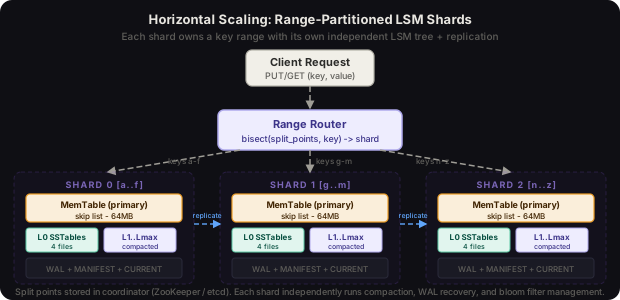
A single-node LSM engine scales vertically by tuning memtable size, compaction parallelism, and level size ratios. Horizontal scaling requires partitioning keys across independent LSM tree instances.
Compaction Tuning
Compaction throughput is the most critical tuning knob. If background compaction can’t keep pace with foreground writes, L0 fills up and the engine applies write throttling (slowing down writes) or write stalls (blocking writes entirely) to prevent unbounded read amplification.
class CompactionController:
    """Rate-limit and parallelize compaction to avoid write stalls."""

    L0_SLOWDOWN_THRESHOLD = 20  # start throttling at 20 L0 files
    L0_STOP_THRESHOLD = 36      # block writes at 36 L0 files

    def __init__(self, max_compaction_threads: int = 4,
                 max_bytes_per_sec: int = 200 * 1024 * 1024):
        self._pool = ThreadPoolExecutor(max_workers=max_compaction_threads)
        self._rate_limiter = TokenBucket(max_bytes_per_sec)
        self._l0_file_count = 0

    def write_delay_micros(self) -> int:
        """Return how many microseconds to delay each write (backpressure)."""
        if self._l0_file_count >= self.L0_STOP_THRESHOLD:
            return -1  # signal: stop all writes

        if self._l0_file_count >= self.L0_SLOWDOWN_THRESHOLD:
            excess = self._l0_file_count - self.L0_SLOWDOWN_THRESHOLD
            max_excess = self.L0_STOP_THRESHOLD - self.L0_SLOWDOWN_THRESHOLD
            # exponential slowdown: 0 to 1000ms delay
            return int(1000 * 1000 * (excess / max_excess) ** 2)

        return 0
Block Cache
All sstable data blocks and index blocks are cached in an in-memory block cache (typically LRU or Clock-based). The block cache is shared across all sstable files and serves as the primary read acceleration mechanism alongside bloom filters.
RocksDB defaults to an 8MB block cache, but production deployments typically configure it to 50-80% of available RAM. With 32 GB RAM and 10 TB on disk, a 24 GB block cache is common, serving the working set hot while cold keys take disk reads.
Range Partitioning for Horizontal Scale
For datasets exceeding single-machine capacity, we range-partition the key space: shard 0 owns [A, G), shard 1 owns [G, M), etc. Each shard runs a completely independent LSM tree instance. A routing layer maps incoming keys to the correct shard.
Range partitioning preserves sorted order across shards, enabling distributed range scans. Consistent hash partitioning is simpler to balance but breaks range scan locality.
class RangeRouter:
    def __init__(self, split_points: List[bytes], shards: List['LSMEngine']):
        assert len(split_points) == len(shards) - 1
        self._split_points = split_points
        self._shards = shards

    def route(self, key: bytes) -> 'LSMEngine':
        import bisect
        idx = bisect.bisect_right(self._split_points, key)
        return self._shards[idx]

    def range_scan(self, start_key: bytes, end_key: bytes):
        """Scatter range scan across shards, merge results in sorted order."""
        start_shard = bisect.bisect_right(self._split_points, start_key)
        end_shard = bisect.bisect_right(self._split_points, end_key)
        partial_scans = [
            self._shards[i].scan(start_key, end_key)
            for i in range(start_shard, end_shard + 1)
        ]
        # merge pre-sorted streams
        return heapq.merge(*partial_scans, key=lambda kv: kv[0])
Key Insight
Range partitioning creates a natural hot-spot problem with monotonically increasing keys (timestamps, auto-increment IDs). All writes go to the last shard. The fix is key hashing before routing (breaking range scan), time-based shard rotation, or salting keys with a prefix that spreads writes. This is why Cassandra uses token-based consistent hashing by default, trading range scan efficiency for write distribution.
Failure Modes and Recovery
WAL Corruption on Crash
If the process crashes mid-WAL-write, the partial record at the tail of the WAL will have a mismatched CRC32. The recovery code detects this and stops replay at that point, discarding the partial write. This means the write was not acknowledged (the client would have gotten a timeout), so discarding it is correct.
Compaction Crash
If the process crashes during compaction, new sstable files may exist on disk but not be registered in the MANIFEST. On restart, the engine scans for any sstable files not referenced by the MANIFEST and deletes them. The old input files remain registered (their deletion is only committed when the new MANIFEST record is written), so the data is not lost.
L0 Compaction Stall
If writes consistently outpace compaction, L0 fills to the stop threshold and all writes block. Recovery options:
- Increase compaction thread count
- Reduce
memtableflush frequency (largermemtablesize) - Implement write-rate limiting at the application layer before reaching the stall threshold
- Add disk I/O bandwidth (compaction is I/O bound, not CPU bound)
Bloom Filter on Restart
Bloom filters are serialized as part of the sstable file’s filter block. On startup, they don’t need to be rebuilt - they’re read directly from disk and placed in the block cache on first access. This makes restarts fast even with thousands of sstable files.
Real System
HBase’s Write-Ahead Log recovery is distributed: each region server maintains its own WAL, but on region server failure, the master reassigns affected regions to healthy servers and those servers replay the failed server’s WAL segments (stored in HDFS) to recover the memstore. This distributed WAL replay is the primary source of HBase’s recovery latency spikes - it’s not uncommon to see 30-60 second unavailability per region on region server failure.
Comparison of Approaches
| Property | LSM Tree | B-Tree | Fractal Tree |
|---|---|---|---|
| Write latency | Low (sequential) | Medium (random) | Low (sequential) |
| Write amplification | 10-70x | 2-5x | 3-10x |
| Read latency | Medium (multi-level) | Low (O(log n) direct) | Medium |
| Read amplification | 2-10 files | 1 page | 2-5 files |
| Space amplification | 1.1-2x | 1.3-1.5x | 1.1-2x |
| Range scan | Good (sorted SSTables) | Good (B-tree leaves) | Good |
| Random reads | OK with bloom filters | Excellent | Good |
| Delete performance | Deferred (tombstone) | Immediate | Deferred |
| Compaction cost | Continuous background | None | Continuous background |
When to Use LSM Trees
Use LSM trees when: write throughput is the primary constraint, write workloads are bursty or sustained at high rates, delete-heavy workloads are uncommon, and you can afford background I/O budget for compaction.
Use B-trees when: read latency is more important than write latency, random point lookups dominate, update-in-place semantics matter, or you need transaction support with row-level locking (B-tree page locking is well-understood).
Use columnar stores (Parquet, ORC) when: analytical workloads dominate, you’re doing aggregations over a subset of columns, and write patterns are batch-oriented.
Key Takeaways
-
Sequential writes win: LSM trees achieve high write throughput by converting all writes to sequential disk appends. This is the fundamental insight that makes the architecture work.
-
Immutability is the enabler:
SSTablefiles are never modified after creation. This makes concurrent reads trivially safe (no locking), enables crash recovery viaMANIFEST, and simplifies compaction. -
The three amplification factors: every design decision in an LSM engine is a tradeoff between write amplification, read amplification, and space amplification. You cannot minimize all three simultaneously.
-
Bloom filters are essential for read performance: without bloom filters, a point lookup for a missing key requires checking every
sstableat every level. With a well-tuned bloom filter (10 bits/key), 99% of these checks are eliminated. -
Tombstones are dangerous: deletion is deferred, which means tombstones can sit in the system for a long time. The tombstone resurrection bug (a deleted key reappearing) is real, subtle, and requires careful snapshot tracking to prevent.
-
Compaction must be provisioned: the compaction write amplification factor (10-70x for leveled compaction) means that storage throughput must be provisioned for compaction I/O, not just foreground write I/O.
-
WAL + MANIFEST = durability + consistency: these two sequential files are the safety net. The WAL ensures no data loss on crash; the MANIFEST ensures no file-level corruption on crash.
Frequently Asked Questions
Q: Why do L0 files overlap but L1+ files don’t?
L0 files are flushed memtables - they contain whatever key range happened to be in the memtable at flush time, which can overlap with any previous L0 file. During compaction from L0 to L1, we take all L0 files (they might all overlap each other) and merge them into a set of non-overlapping files for L1. This is why L0-to-L1 compaction is expensive: it involves all L0 files.
Q: How does RocksDB handle large values?
Large values (over ~1KB) are stored inline in the sstable by default. RocksDB’s BlobDB extension stores values larger than a threshold separately in blob files, keeping the sstable index small. The sstable stores only a pointer (blob file ID + offset). This dramatically reduces compaction cost because blob files can be GC’d independently without rewriting the key-space index.
Q: What happens if compaction generates a file during a crash?
New sstable files are written to a temp path. The MANIFEST is updated atomically after all new files are fully written and fsync’d. On restart, any files not in the MANIFEST are orphans and are deleted. Input files to the compaction remain in the MANIFEST until the compaction successfully commits, ensuring data is never lost.
Q: How many levels should we use?
LevelDB default is 7 levels. With a 10x size ratio, this handles: L0=4 files, L1=10MB, L2=100MB, L3=1GB, L4=10GB, L5=100GB, L6=1TB. For datasets larger than 1TB, add more levels or increase the multiplier. RocksDB’s max_bytes_for_level_base and max_bytes_for_level_multiplier control this.
Q: Can we do secondary index queries on an LSM engine?
LSM engines natively support only primary key lookups and primary key range scans. Secondary indexes are implemented by maintaining a separate LSM tree instance that maps secondary key -> primary key. Writes to the primary table generate a corresponding write to the secondary index table. This is how Cassandra implements secondary indexes and materialized views.
Interview Questions
Explain write amplification in leveled compaction and how you’d measure it.
Write amplification in leveled compaction is the ratio of bytes written to disk (including compaction I/O) to bytes written by the application. For leveled compaction with L levels and 10x size ratio, the worst-case write amplification is 10 * L. To measure it, divide total disk write bytes (from OS I/O stats) by application write bytes (from your application metrics) over a fixed window. RocksDB exposes this via rocksdb.compaction-write-amplification statistics.
How would you reduce read latency for a point lookup workload on an LSM engine?
- Tune bloom filters to 10-12 bits per key to reduce false positives
- Increase block cache size to serve data blocks from RAM
- Use fewer levels (increases space amplification, reduces read amplification)
- Enable
pin_l0_filter_and_index_blocks_in_cacheto keep L0 metadata hot - For a read-heavy workload, consider adding a separate read cache (Memcached) in front
What is read amplification and how does leveled compaction bound it?
Read amplification is the number of disk reads needed to serve a single point lookup. In an LSM tree with L levels, a worst-case read touches 1 memtable + (N_L0 files) + 1 file per level L1..Ln. Leveled compaction bounds the L1+ component to exactly 1 file per level (no overlaps within a level), so total read amplification is at most 1 + L0_count + (L-1). Bloom filters reduce the practical amplification by eliminating files that don’t contain the key.
Walk me through what happens when a key is deleted and later the tombstone disappears.
DELETE(key)writes atombstoneentry (sequence S_del) to the activememtablememtableflushes to an L0sstablecontaining the tombstone- Compaction merges the L0 file through L1, L2, … The tombstone travels down while older versions of the key (at lower levels with sequence < S_del) also get compacted
- When the tombstone reaches the bottom level (Lmax) and no snapshot older than S_del is active, the compaction drops the tombstone and all older versions of the key
- If a snapshot older than S_del is still active when the tombstone reaches Lmax, the compaction cannot drop the tombstone - it keeps it and retries at the next compaction. This ensures no resurrection.
How would you implement atomic multi-key writes (mini-transactions) on an LSM engine?
RocksDB’s WriteBatch writes multiple key-value pairs atomically: all entries in the batch share a single sequence number, ensuring they’re all visible or all invisible to readers. For cross-shard atomicity, you need a two-phase commit (2PC) protocol: prepare phase writes a PREPARE record to a log on all shards, commit phase writes a COMMIT record. On recovery, any PREPARE without a matching COMMIT is rolled back.
Premium Content
Unlock the full article along with everything else in the archive — all in one place.