Build a Real-Time Analytics Dashboard at 100B Events
data-engineering scalability performance
System Design Deep Dive
Real-Time Analytics Dashboard
Ingesting 100B events/day while answering arbitrary aggregate queries in under a second - without precomputing everything
Imagine you’re building a product analytics platform. Your users fire events - page views, button clicks, API calls, purchases - at a rate of 1.2 million per second. On the other end, a product manager has a dashboard open with 12 widgets, each asking a different aggregate: “How many users clicked checkout in the last 30 minutes, broken down by country?” They refresh it constantly. They want answers in under a second.
The naive solution is to precompute every possible aggregate. But “every possible aggregate” over arbitrary time windows, arbitrary filter combinations, and arbitrary grouping dimensions is combinatorially explosive. For a dataset with 100 dimensions and 10 possible values per dimension, precomputing all combinations would require 10^100 aggregates. That’s not a storage problem; it’s a physics problem.
The real tension is between write throughput and query flexibility. Precomputed roll-ups give you fast reads but lock you into fixed query shapes. Raw event storage gives you full flexibility but makes queries prohibitively slow on 100 billion events. Neither extreme works. The architecture we’re designing lives in the middle: pre-aggregate at coarse granularities, store columnar raw data for fine-grained queries, and use approximate algorithms where exactness isn’t required.
We need to solve for sub-second query latency, flexible dimension grouping, real-time freshness (events visible within 10 seconds of ingestion), and a write path that doesn’t melt under 1.2M events/second.
Requirements and Constraints
Functional Requirements
- Ingest arbitrary event types with flexible schema (event name, timestamp, user ID, arbitrary key-value properties)
- Support aggregate queries:
COUNT,SUM,COUNT DISTINCT,PERCENTILEover any dimension combination - Support time window queries: last N minutes, fixed time ranges, rolling windows
- Provide real-time results - events ingested within 10 seconds must appear in query results
- Support dashboard-style queries with multiple concurrent aggregations
Non-Functional Requirements
- Ingest: 1.2 million events/second peak (100 billion events/day)
- Query latency: p99 under 1 second for dashboard queries
- Freshness: 10-second event visibility SLA
- Storage: 90-day hot retention, 2-year cold retention
- Availability: 99.9% uptime for query path
- Concurrent dashboard users: up to 50,000 active dashboards
Constraints
- Exact
COUNT DISTINCTat this scale requires HyperLogLog approximation (within 2% error) - Pre-aggregation is limited to fixed dimensions and 1-minute granularity
- Cross-dataset joins are not supported in real-time queries
- Schema changes require a migration window
High-Level Architecture
The system splits into four major subsystems: an ingestion tier, a stream processing layer, a dual-store (columnar raw + materialized roll-ups), and a query federation layer.
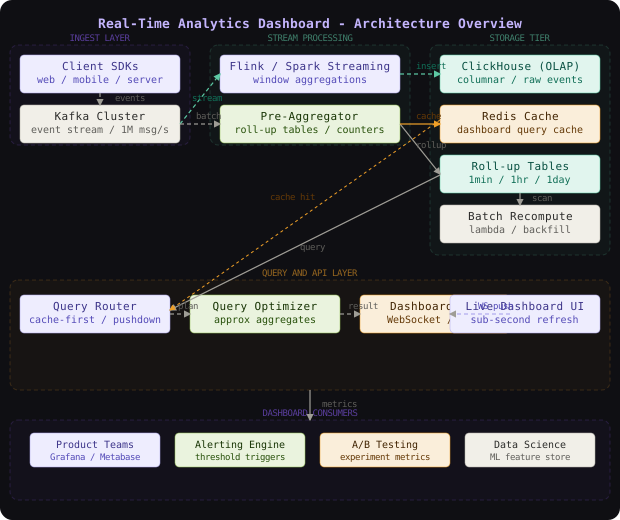
Events arrive at the Ingestion API, a stateless fleet of HTTP servers that validate, enrich (adding server-side timestamps and geo-tags), and publish events to Kafka. Kafka acts as the durable buffer - it absorbs write bursts and decouples the ingestion rate from the processing rate.
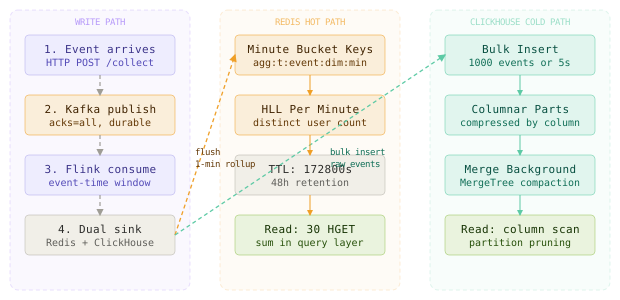
The Stream Processor (Apache Flink) reads from Kafka and maintains two outputs: it writes raw events to ClickHouse (a columnar OLAP store optimized for analytical scans) and it writes pre-aggregated roll-ups to Redis for ultra-low-latency dashboard reads.
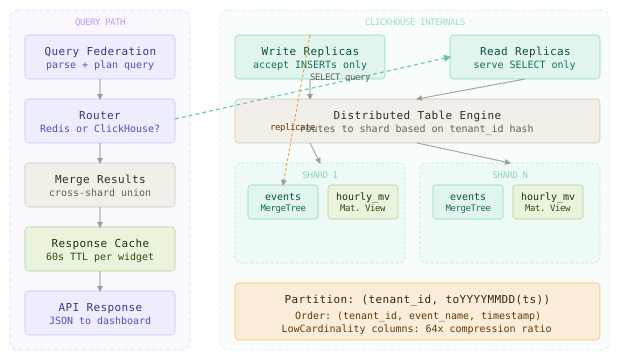
The Query Layer is a federation service: for recent data (last 30 minutes), it reads pre-aggregated roll-ups from Redis. For historical queries, it routes to ClickHouse and executes columnar scans. Results are merged and returned.
The dual-store design - Redis for hot aggregates and ClickHouse for historical raw data - lets you serve 90% of dashboard queries from Redis in under 10ms while retaining the full query flexibility of columnar storage for ad-hoc analysis.
The Ingestion Tier
The ingestion tier’s job is to accept events without ever being the bottleneck. Think of it as a loading dock at a warehouse - its only job is to receive shipments and hand them off. It does no heavy lifting.
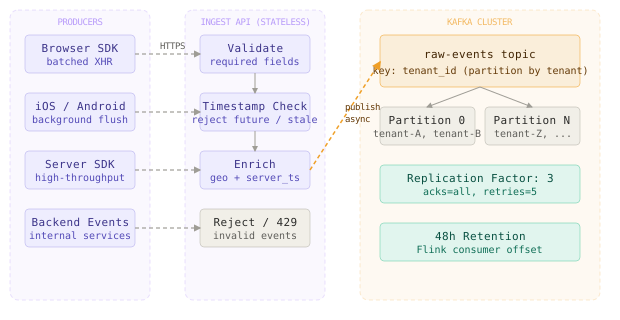
Each ingestion server is stateless and horizontally scalable behind a load balancer. Event validation is intentionally minimal - we check required fields (event_name, user_id, timestamp) and reject events with timestamps more than 5 minutes in the future or 48 hours in the past (to limit out-of-order write complexity).
Events are published to Kafka with the user’s tenant_id as the partition key. This ensures all events from a single tenant land on the same partition, enabling ordered processing per tenant without global coordination.
# Ingestion API event handler
import json
import time
from kafka import KafkaProducer
from typing import Dict, Any

producer = KafkaProducer(
    bootstrap_servers=['kafka1:9092', 'kafka2:9092', 'kafka3:9092'],
    value_serializer=lambda v: json.dumps(v).encode('utf-8'),
    acks='all',           # wait for leader + all replicas
    retries=5,
    max_in_flight_requests_per_connection=1
)

def ingest_event(event: Dict[str, Any], tenant_id: str) -> None:
    now_ms = int(time.time() * 1000)
    event_ts = event.get('timestamp', now_ms)

    # reject events too far in past or future
    if abs(now_ms - event_ts) > 48 * 3600 * 1000:
        raise ValueError(f"event timestamp out of range: {event_ts}")

    enriched = {
        **event,
        'server_ts': now_ms,
        'tenant_id': tenant_id,
        'ingested_at': now_ms,
    }
    producer.send(
        topic='raw-events',
        key=tenant_id.encode(),
        value=enriched
)Segment’s analytics pipeline uses a nearly identical pattern: stateless collectors publish to Kafka with workspace ID as partition key, then Flink consumers fan out to multiple downstream sinks. This decoupling let them scale from 100M to 500B events/month without redesigning the ingestion layer.
The Stream Processor
The stream processor is the most complex component. It reads from Kafka, maintains stateful aggregations in memory, and flushes results to both Redis and ClickHouse. Think of it as a bank of tellers who each handle their own queue - they do local arithmetic fast and periodically reconcile with the central ledger.
The processor runs on Apache Flink with 64 task slots per node and 20 nodes. Each Kafka partition maps to a Flink task, so state is partitioned by tenant to avoid cross-node shuffles.
// Flink stream processor - rolling 1-minute aggregation
public class EventAggregator extends ProcessWindowFunction<
        Event, AggregateResult, String, TimeWindow> {

    @Override
    public void process(
            String tenantId,
            Context ctx,
            Iterable<Event> events,
            Collector<AggregateResult> out) {

        Map<String, Long> countByDimension = new HashMap<>();
        HyperLogLog hll = new HyperLogLog(12); // 0.8% std error

        for (Event e : events) {
            String dimKey = e.getEventName() + ":" + e.getCountry();
            countByDimension.merge(dimKey, 1L, Long::sum);
            hll.offer(e.getUserId());
        }

        out.collect(new AggregateResult(
            tenantId,
            ctx.window().getStart(),
            ctx.window().getEnd(),
            countByDimension,
            hll.cardinality()   // approximate distinct users
        ));
    }
}HyperLogLog lets you compute distinct user counts over billions of events using only 1.5KB of memory per counter, with a predictable 0.8% standard error. For a dashboard showing “2,847,392 unique users”, being off by 23,000 is completely acceptable, and the memory savings are the difference between feasible and impossible.
The processor maintains two types of output:
Roll-up to Redis: Every minute, the processor flushes per-minute aggregates to Redis with a 48-hour TTL. Keys follow the pattern agg:{tenant}:{metric}:{dim_combo}:{minute_bucket}. Dashboard queries for “last 30 minutes” read 30 keys from Redis and sum them in the query layer - this takes under 5ms.
Raw events to ClickHouse: Every 1,000 events or 5 seconds (whichever comes first), the processor bulk-inserts raw events into ClickHouse using the HTTP interface. ClickHouse’s columnar storage makes range scans over billions of rows feasible for ad-hoc historical queries.
Flink’s exactly-once semantics require two-phase commit with both Kafka and your downstream sinks. If you configure at-least-once for speed, you’ll see duplicate counts in your aggregates whenever a task manager restarts. For analytics, duplicates corrupt all metrics - users will see sudden drops when the double-counted events are deduplicated.
The Columnar Store (ClickHouse)
ClickHouse is the backbone for historical queries. A columnar store organizes data by column rather than row: all event_name values are stored contiguously, all timestamp values are contiguous, and so on. When you query COUNT(*) WHERE event_name = 'purchase', the database reads only the event_name column from disk - not the entire row. For 100-column events, this gives a 100x reduction in I/O.
-- ClickHouse events table with optimal partitioning
CREATE TABLE events (
    tenant_id       LowCardinality(String),
    event_name      LowCardinality(String),
    user_id         String,
    session_id      String,
    timestamp       DateTime64(3, 'UTC'),
    country         LowCardinality(String),
    device_type     LowCardinality(String),
    properties      Map(String, String)
) ENGINE = MergeTree()
PARTITION BY (tenant_id, toYYYYMMDD(timestamp))
ORDER BY (tenant_id, event_name, timestamp)
SETTINGS index_granularity = 8192;

-- Materialized view for fast pre-aggregated counts
CREATE MATERIALIZED VIEW events_hourly_mv
ENGINE = SummingMergeTree()
PARTITION BY (tenant_id, toYYYYMM(hour))
ORDER BY (tenant_id, event_name, country, hour)
AS SELECT
    tenant_id,
    event_name,
    country,
    toStartOfHour(timestamp) AS hour,
    count() AS event_count,
    uniqState(user_id) AS unique_users_state
FROM events
GROUP BY tenant_id, event_name, country, hour;
The LowCardinality type is critical: for columns with fewer than 65,536 distinct values (like event_name or country), ClickHouse stores them as dictionary-encoded integers. This compresses event_name = 'page_view' from 9 bytes to 1 byte across billions of rows.
The partition key (tenant_id, toYYYYMMDD(timestamp)) ensures that tenant data is co-located and time-range queries skip irrelevant partitions entirely. A query for “last 7 days of tenant ABC” touches only 7 partition directories instead of the full dataset.
Cloudflare uses ClickHouse for their analytics dashboard, processing 6 million requests per second. They partition by datacenter and time, and rely on ClickHouse’s native data skipping indexes (min-max and bloom filter) to reduce I/O by 99% on most dashboard queries. Their p99 query latency is under 200ms over petabytes of data.
The Pre-Aggregation Layer (Redis)
Pre-aggregated roll-ups live in Redis as sorted sets and hash maps. The query “how many button_click events from users in Germany in the last 30 minutes?” becomes 30 Redis HGET calls, one per minute bucket, summed client-side. Each call is microseconds.
# Writing a minute-bucket aggregate to Redis
import redis
import json

r = redis.Redis(host='redis-cluster', port=6379, decode_responses=True)

def flush_aggregate(tenant_id: str, agg: dict, window_start_ms: int) -> None:
    minute_bucket = window_start_ms // 60000  # floor to minute
    pipe = r.pipeline(transaction=False)

    for (event_name, country), count in agg['counts'].items():
        key = f"agg:{tenant_id}:{event_name}:{country}:{minute_bucket}"
        pipe.hincrby(key, 'event_count', count)
        pipe.expire(key, 172800)  # 48-hour TTL

    # store HLL state for distinct user counts
    hll_key = f"hll:{tenant_id}:users:{minute_bucket}"
    pipe.set(hll_key, agg['hll_serialized'])
    pipe.expire(hll_key, 172800)

    pipe.execute()

# Reading a 30-minute window from Redis
def query_last_30_minutes(
        tenant_id: str, event_name: str, country: str,
        current_minute_bucket: int) -> dict:
    pipe = r.pipeline(transaction=False)
    for i in range(30):
        bucket = current_minute_bucket - i
        key = f"agg:{tenant_id}:{event_name}:{country}:{bucket}"
        pipe.hget(key, 'event_count')
    counts = pipe.execute()
return {'total': sum(int(c or 0) for c in counts)}Redis cluster cardinality limits bite hard at analytics scale. If you shard by tenant and have 10,000 active tenants each with 1,000 distinct dimension combinations, you need 10 million Redis keys active at any moment. Plan your Redis cluster sizing around keys, not just bytes - a Redis node starts showing latency degradation above 100 million keys.
Data Model
The data model has two layers: the raw event store and the pre-aggregated roll-up store.
-- Raw events table in ClickHouse (see above for full DDL)
-- Schema per-tenant - each tenant's events are in the same table
-- but partition-isolated

-- Tenant metadata - stored in Postgres
CREATE TABLE tenants (
    id              UUID PRIMARY KEY DEFAULT gen_random_uuid(),
    name            VARCHAR(255) NOT NULL,
    plan            VARCHAR(50) NOT NULL DEFAULT 'starter',
    ingestion_quota INTEGER NOT NULL DEFAULT 1000000,  -- events/day
    created_at      TIMESTAMPTZ DEFAULT NOW()
);

-- Dashboard configuration - stored in Postgres
CREATE TABLE dashboards (
    id              UUID PRIMARY KEY DEFAULT gen_random_uuid(),
    tenant_id       UUID NOT NULL REFERENCES tenants(id),
    name            VARCHAR(255) NOT NULL,
    widgets         JSONB NOT NULL DEFAULT '[]',
    created_at      TIMESTAMPTZ DEFAULT NOW()
);

-- Widget definition example (stored in widgets JSONB array)
-- {
--   "id": "w1",
--   "type": "timeseries",
--   "metric": "event_count",
--   "event_name": "page_view",
--   "group_by": "country",
--   "time_window": "30m"
-- }
The properties Map(String, String) column in ClickHouse deserves attention. Rather than defining a fixed schema per event type, we store arbitrary key-value pairs in a Map column. ClickHouse stores this efficiently and allows queries like properties['plan'] = 'enterprise'. The tradeoff: Map columns can’t be indexed with bloom filters, so high-cardinality property filters require full column scans.
Key Algorithms and Protocols
HyperLogLog for Distinct Counts
Counting distinct users is the hardest problem in analytics. An exact COUNT DISTINCT over 1 billion events requires either sorting (O(n log n)) or a hash set that holds all user IDs in memory (O(n) space). Neither is feasible at our scale.
HyperLogLog works like this: hash each item, take the leading zeros in the binary hash, and use the maximum number of leading zeros seen as an estimator of cardinality. Concretely, if you’ve seen a hash starting with 10 leading zeros, you’ve probably seen around 2^10 = 1,024 distinct items. Averaging this estimate across 2^k buckets reduces variance to 1.04/sqrt(2^k).
# HyperLogLog implementation (simplified)
import hashlib
import math

class HyperLogLog:
    def __init__(self, b: int = 12):
        # b = 12 -> 4096 buckets, ~0.8% std error, 4KB memory
        self.b = b
        self.m = 2 ** b
        self.registers = [0] * self.m

    def _hash(self, item: str) -> int:
        return int(hashlib.sha256(item.encode()).hexdigest(), 16)

    def add(self, item: str) -> None:
        h = self._hash(item)
        bucket = h >> (64 - self.b)           # top b bits -> bucket index
        remaining = h & ((1 << (64 - self.b)) - 1)
        # count leading zeros in remaining bits
        rho = min(64 - self.b, (remaining ^ (remaining - 1)).bit_length())
        self.registers[bucket] = max(self.registers[bucket], rho)

    def cardinality(self) -> int:
        alpha = 0.7213 / (1 + 1.079 / self.m)
        Z = sum(2 ** (-r) for r in self.registers)
        raw = alpha * self.m ** 2 / Z

        # small range correction
        if raw <= 2.5 * self.m:
            zeros = self.registers.count(0)
            if zeros > 0:
                return round(self.m * math.log(self.m / zeros))
        return round(raw)

    def merge(self, other: 'HyperLogLog') -> 'HyperLogLog':
        # HLLs can be merged by taking element-wise max of registers
        result = HyperLogLog(self.b)
        result.registers = [max(a, b) for a, b in
                           zip(self.registers, other.registers)]
        return result
The merge operation is the killer feature: you can compute HLLs independently per minute bucket and merge them to answer “distinct users over the last hour” with no additional data - just max the registers. This is what makes pre-aggregated HLL storage in Redis viable.
HyperLogLog’s merge property means you can answer “distinct users in the last 7 days” by merging 7 daily HLLs, each built independently. This lets you store one HLL per day per tenant per event type rather than raw user IDs, reducing storage by four orders of magnitude.
Pre-Aggregation vs. Raw Scan Query Routing
The query layer decides, per widget, whether to serve from Redis roll-ups or ClickHouse raw data:
# Query routing logic
from datetime import datetime, timedelta

def route_query(query: dict) -> str:
    time_range_minutes = query['time_range_minutes']
    dimensions = query.get('group_by_dimensions', [])
    metric = query['metric']

    # use Redis roll-ups if:
    # 1. time range is <= 48 hours (our Redis TTL)
    # 2. dimensions are in our pre-aggregated set
    # 3. metric is count or sum (not percentile - no pre-agg for that)
    pre_agg_dimensions = {'event_name', 'country', 'device_type'}
    pre_agg_metrics = {'event_count', 'unique_users'}

    if (time_range_minutes <= 2880  # 48 hours
            and set(dimensions) <= pre_agg_dimensions
            and metric in pre_agg_metrics):
        return 'redis'
    return 'clickhouse'
Scaling and Performance
The system scales each tier independently, which is the primary design advantage over a monolithic approach.
Capacity Estimation:
  Ingestion:
    - Peak: 1.2M events/second
    - Avg event size: 800 bytes (after enrichment)
    - Kafka throughput: 1.2M * 800B = 960 MB/s
    - Kafka retention: 48 hours = 960MB/s * 172800s = ~160TB
    - Kafka cluster: 20 brokers, 3x replication factor

  ClickHouse storage:
    - 100B events/day * 800B raw = 80TB/day
    - After columnar compression (8:1 ratio): 10TB/day
    - 90-day hot retention: 900TB
    - Cluster: 30 nodes, 32TB SSD each, 3x replication

  Redis:
    - 10K tenants * 1000 dim combos * 2880 minute-buckets = 28.8B keys
    - 28.8B * 60 bytes per key = ~1.7TB
    - Redis cluster: 20 nodes, 128GB RAM each

  Flink:
    - 20 nodes, 64 slots each = 1280 tasks
    - 1 task per Kafka partition -> 1280 partitions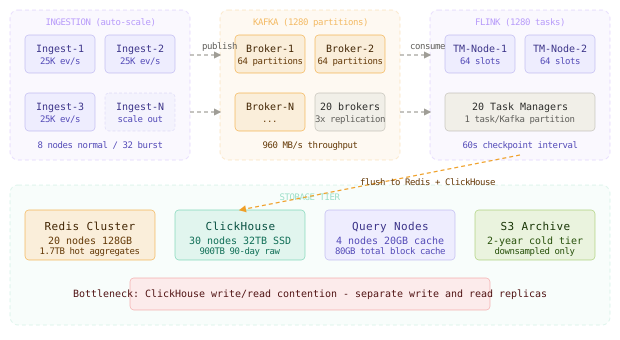
The dominant bottleneck is ClickHouse write throughput. ClickHouse’s MergeTree engine handles writes by buffering in-memory parts and merging them asynchronously, but concurrent heavy writes and heavy reads on the same node degrade query latency. The fix is to separate write nodes from read nodes using a replica split: write replicas accept inserts, read replicas serve queries. ClickHouse’s native replication keeps them in sync.
Amplitude’s analytics platform uses a similar tiered architecture: Redis for real-time aggregates serving dashboards, and Druid (another columnar store) for historical queries. They found that 92% of their dashboard queries can be served entirely from Redis, making the p99 experience nearly instant even though historical queries take several seconds.
Failure Modes and Recovery
| Failure | Detection | Impact | Recovery |
|---|---|---|---|
| Kafka broker down | Kafka controller detects missed heartbeat within 10s | Consumers re-read from other replicas; brief ingestion lag | Automatic leader election; producers retry with backoff |
| Flink task manager crash | Flink JobManager detects via heartbeat | Tasks re-assign to remaining TMs; replay from last checkpoint | Checkpoint replay from Kafka offset; exactly-once restored |
| Redis node failure | Redis Sentinel detects within 5s | Queries fall back to ClickHouse; hot aggregates unavailable | Automatic failover to replica; warm-up from ClickHouse backfill |
| ClickHouse node down | Health check via HTTP /ping | Queries distributed to replicas; insert queue backs up | Distributed table routes around failed shard; catch-up replication |
| Event storm (10x traffic) | P99 ingestion latency rises | Kafka consumer lag grows; Redis write throughput saturates | Auto-scale ingestion tier; Flink scales task slots; Redis pipeline batching |
| Clock skew on producer | Server-side timestamp vs client timestamp diff > 5s | Events land in wrong minute bucket in roll-ups | Canonical server timestamp overwrites client timestamp; flag skewed events |
The most common operational failure is Flink checkpoint timeout during traffic spikes. When task managers are under heavy load, checkpoints take longer than the configured interval. If checkpointing falls behind, recovery replays more events than expected, causing a temporary spike in duplicate-corrected counts visible to dashboard users. Set checkpoint interval to 3x your expected p95 checkpoint duration.
Comparison of Approaches
| Approach | Query Latency | Write Scalability | Query Flexibility | Operational Complexity |
|---|---|---|---|---|
| Precomputed OLAP cubes | <10ms | Low (schema locked) | None (fixed dims only) | High (cube maintenance) |
| Raw columnar scan (ClickHouse only) | 1-30s | High | Full | Medium |
| Lambda (batch + speed layer) | 50-500ms | High | High | Very high |
| Tiered: Redis + ClickHouse | <5ms (hot), 1-5s (cold) | High | High for cold, limited for hot | Medium |
| Druid with real-time ingestion | 50-200ms | Very high | High | Very high |
| TimescaleDB (PostgreSQL extension) | 100ms-5s | Medium | Full SQL | Low |
The tiered Redis + ClickHouse approach is the right choice for this workload because it serves the 92% of queries that fit pre-aggregated dimensions in under 10ms, while retaining full ClickHouse flexibility for ad-hoc analysis. Druid is operationally superior for pure real-time analytics but requires a complex ZooKeeper-backed cluster that’s expensive to run. The Lambda architecture is a trap: you maintain two code paths, and they inevitably diverge.
Key Takeaways
- Pre-aggregation vs raw scan is a false binary: the right answer is both, tiered by recency and query pattern.
- HyperLogLog is essential for distinct counts: exact counts at 100B-event scale are impractical; 0.8% error is acceptable for dashboards.
- Columnar storage compresses 8:1: ClickHouse’s dictionary encoding and delta compression turn 80TB/day into 10TB/day.
- Partition strategy determines query performance: partitioning by
(tenant_id, date)and ordering by(tenant_id, event_name, timestamp)makes tenant-scoped range queries skip terabytes of data. - Merge property of HLL enables temporal composition: storing per-day HLLs lets you answer multi-day distinct-user queries without raw data.
- Write-read replica split prevents ClickHouse contention: separating insert load from query load halves p99 query latency under heavy insert volume.
- Redis TTL must match your roll-up retention: if you flush 1-minute roll-ups with a 48-hour TTL, queries beyond 48 hours always fall back to ClickHouse - size your ClickHouse cluster accordingly.
- Flink checkpoint interval drives recovery time: a 60-second checkpoint interval means up to 60 seconds of re-processing on failure, during which aggregates may be temporarily inflated.
The counterintuitive lesson: for a real-time analytics system, the bottleneck is almost never the query engine - it’s the data model. Systems that fail at this scale almost always fail because they tried to model events with a fixed schema, forcing schema migrations every time a product team adds a new property. Using a Map(String, String) properties column in ClickHouse trades some indexing capability for zero-friction schema evolution, and at 100B events/day, that tradeoff is almost always correct.
Frequently Asked Questions
Q: Why not use Elasticsearch for this? A: Elasticsearch is optimized for full-text search and document retrieval, not aggregate analytics. Its aggregation performance degrades sharply beyond a few million documents per shard because it uses inverted indexes rather than columnar storage. ClickHouse runs analytical aggregates 10-100x faster than Elasticsearch on the same hardware. Elasticsearch’s strength is log search with complex text predicates; ClickHouse’s strength is OLAP aggregations over billions of rows.
Q: Can we use a single ClickHouse deployment instead of the Redis tier? A: For dashboard queries over the last 30 minutes, ClickHouse would need to scan millions of rows per widget refresh. With 50,000 concurrent dashboard users, each polling 12 widgets every 5 seconds, that’s 120,000 queries per second hitting ClickHouse. ClickHouse can handle perhaps 5,000 concurrent queries before query queuing degrades latency. The Redis pre-aggregation tier absorbs 95% of that load.
Q: Why Flink over Kafka Streams or Spark Streaming? A: Flink’s stateful processing with exactly-once guarantees and its native windowing API (tumbling, sliding, session windows) match the requirement exactly. Kafka Streams lacks the shuffle/repartition primitives needed for cross-partition aggregations. Spark Structured Streaming adds micro-batch latency of 1+ seconds, which conflicts with our 10-second freshness SLA. Flink’s event-time semantics also handle late events correctly, which matters for mobile clients with intermittent connectivity.
Q: How do you handle events arriving late - e.g., mobile clients that batched 30 minutes of events? A: Flink’s event-time watermarks allow a configurable late-event tolerance. We set a 10-minute allowed lateness: events up to 10 minutes late update the correct minute bucket retroactively. Events beyond 10 minutes late are written directly to ClickHouse (bypassing pre-aggregation) and are visible only in historical queries, not in Redis-served dashboard tiles. The dashboard shows a “data may be incomplete” indicator for the most recent window.
Q: How do you handle multi-tenancy isolation in ClickHouse?
A: Tenant isolation in a shared ClickHouse table relies on query-level tenant_id filtering and partition-level data locality. We use ClickHouse’s row-level security (RLS) policies to enforce tenant_id in all queries. For large enterprise tenants with strict isolation requirements, we provision dedicated ClickHouse clusters. Partition pruning by tenant_id ensures that even in a shared cluster, tenant A’s query never reads tenant B’s data blocks.
Q: What’s the cost model at 100B events/day? A: Dominant costs are Kafka ($12K/month for 20 brokers), ClickHouse ($45K/month for 30 SSD nodes + 3x replication), and Redis ($8K/month for 20 nodes). Total infrastructure is roughly $70K/month. At a typical analytics SaaS price of $0.50 per million events, 100B events/day = 3T/month = $1.5M/month revenue, giving 95% gross margin after infrastructure. The ClickHouse cost per query-answered is the key metric to optimize.
Interview Questions
Q: How would you design the schema for ClickHouse to minimize query latency for tenant-specific time-range queries?
Expected depth: Discuss partition key choice (tenant_id + date), ordering key (tenant_id + event_name + timestamp), how ClickHouse’s primary index is sparse (every 8,192 rows), and how the ordering key determines which parts of the index are skipped. Also discuss LowCardinality types for enum-like columns and how dictionary encoding halves storage for high-repeat strings.
Q: Walk me through how you’d implement exactly-once semantics from Kafka through Flink to ClickHouse. Expected depth: Explain Flink’s two-phase commit sink: Flink checkpoints barrier the stream, the ClickHouse sink pre-commits data to a staging table, and only on checkpoint completion does it merge staging to the main table. Discuss idempotency via Flink’s checkpoint IDs, and the failure scenario where a checkpoint completes but the merge step crashes - requiring idempotent merge operations.
Q: A dashboard user complains that their “daily active users” metric dropped 30% yesterday. How do you debug it? Expected depth: The candidate should distinguish between ingestion failures (check Kafka lag, Flink consumer group offsets), processing failures (check Flink task restarts, checkpoint failures), Redis vs ClickHouse discrepancy (compare Redis roll-up sum with ClickHouse raw count), and data source issues (client-side event firing reduced, e.g., app deploy broke tracking). Walk through each layer with the metrics to check at each level.
Q: How would you support custom metric definitions - e.g., “revenue per user per session”? Expected depth: This requires a computed metric layer. Discuss expression evaluation (SUM(revenue) / COUNT DISTINCT(user_id) requires both a sum and an HLL aggregation), how to store computed metric definitions in Postgres and push them to the stream processor as dynamic rules, and the tradeoff between evaluating computed metrics in Flink (fast, requires schema knowledge upfront) vs ClickHouse (flexible, slower).
Premium Content
Unlock the full article along with everything else in the archive — all in one place.