Build Faceted Search with Live Inventory Filters
performance databases scalability
System Design Deep Dive
Faceted Search with Live Inventory
How to keep multi-dimensional filter counts accurate within seconds when inventory changes at scale
Think of a library card catalog. In a physical library, each card represents a book, and there are multiple indexes organized by author, genre, topic, and availability. When a book gets checked out, a librarian manually updates the “available” slot - but across 10,000 cards in 20 different drawers, that manual sync creates a lag. Shoppers on Amazon, Flipkart, or Zalando face the same problem at internet scale: the left sidebar showing “Nike (342 results)” needs to reflect the reality that 50 Nike sneakers just went out of stock during a flash sale, and that count should drop to 292 within seconds, not hours.
Faceted search is the technique of returning aggregate counts per filter dimension alongside search results. Users see “Brand: Nike (342), Adidas (218), Puma (89)” and can click to narrow their results. These counts aren’t cosmetic - they drive user decisions. A count of zero means the user won’t bother clicking. A stale count that says “5 items” but returns zero results is a broken experience that erodes trust and increases cart abandonment. The engineering challenge is that these counts must be correct enough to be useful while inventory changes continuously across a catalog of tens of millions of products.
The naive approach is to run a SQL COUNT(*) query per facet per search request. For a search with 15 active filter dimensions and a catalog of 50 million products, that means 15 separate aggregation queries touching millions of rows - at 50,000 search requests per second, that’s 750,000 full-table scans per second. Even with perfect indexing, this does not work. The opposite extreme - precomputing all facet counts and caching them forever - means a product going out of stock at 2pm won’t be reflected until a nightly batch job rebuilds the index. That is equally unacceptable.
The tension we need to resolve: facet index design for fast reads, real-time filter count update propagation when inventory changes, index refresh latency targets that balance staleness against compute cost, and cache invalidation on inventory change that avoids the thundering herd problem. We also need to handle filter combination explosion - when users combine multiple filters, the permutation space grows exponentially. We need to solve all three simultaneously: sub-100ms facet count retrieval, under 5-second propagation of inventory changes into visible counts, and a system that handles 500 million products without blowing up compute costs.
Requirements and Constraints
Functional Requirements
- Return facet counts for all active filter dimensions alongside search results (brand, price range, rating, availability, category, size, color)
- Reflect inventory changes (stock going to zero, new stock arriving) in filter counts within 5 seconds
- Support multi-filter combinations: user selects “Nike + $50-100 + Rating 4+” and all other facet counts must update to reflect only products matching that combination
- Support at least 20 distinct facet dimensions per product category
- Support catalog sizes up to 500 million products
- Provide approximate counts (within 2% accuracy) as an explicit design tradeoff for performance
Non-Functional Requirements
- Search with facets latency: p99 under 120ms end-to-end including facet count computation
- Facet count freshness: inventory changes reflected in 95% of filter counts within 5 seconds
- Throughput: 50,000 search-with-facets requests per second at peak (holiday traffic)
- Write throughput: 100,000 inventory update events per second (flash sales, warehouse sync)
- Availability: 99.99% uptime; stale counts acceptable during degraded mode but zero results is not
- Storage: facet index must fit within 2TB total for a 500M product catalog
Constraints
- Product catalog is append-heavy but not immutable - attributes like price and availability change frequently
- Filter combinations are not known in advance - users compose arbitrary combinations
- Some facets (brand, category) are low-cardinality (hundreds of values); others (price, rating) are range-based
- No exact count guarantees - the SLA is “useful approximation” not “exact to the integer”
- Inventory changes arrive as events from a warehouse management system, not as direct DB writes
High-Level Architecture
The system is composed of five major layers. The Query Gateway receives search-with-filter requests and orchestrates parallel execution. The Facet Engine computes filter counts using bitmap indexes maintained in memory and on disk. The Search Index (Elasticsearch or a custom inverted index) handles the full-text search and document retrieval. The Inventory Event Pipeline is a Kafka-based stream that captures inventory changes and fans them out to index updaters. The Facet Cache is a Redis cluster that caches computed facet count sets, keyed by the query+filter combination hash.
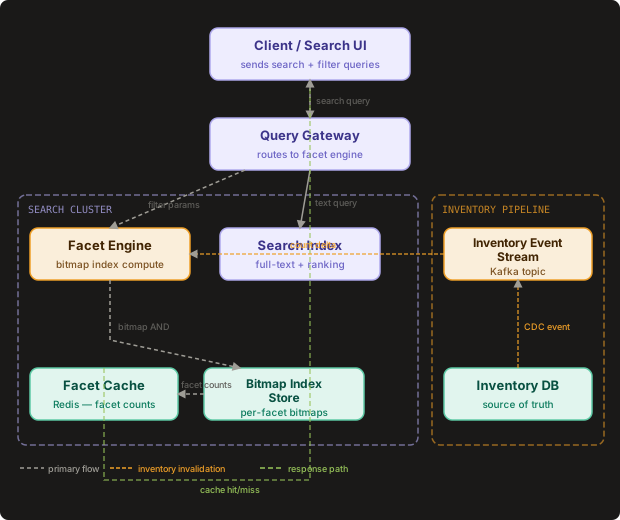
When a search request arrives, the Query Gateway sends two parallel requests: one to the Search Index for ranked document retrieval, and one to the Facet Engine for filter counts. The Facet Engine checks the Facet Cache first. On a cache hit, it returns the cached count set directly. On a cache miss, it executes bitmap index operations against the Bitmap Index Store - performing bitwise AND operations across the active filter dimensions to compute the result set, then running popcount operations to derive counts for each facet value. The result is written back to cache with a short TTL before being merged with search results and returned to the client.
Meanwhile, the Inventory Event Pipeline runs independently. Every inventory change - a product going out of stock, a new shipment arriving, a price update - is published to Kafka. The Facet Updater service consumes these events, identifies which facet bitmaps are affected (a product’s brand, category, price range, and availability facets all need updating), and applies targeted bitmap flips. After each bitmap update, it publishes cache invalidation messages so the Facet Cache discards stale counts within seconds.
The facet engine and the search index are deliberately decoupled: search results and facet counts can come from indexes at slightly different refresh states. A user seeing “Nike (342)” while the actual filtered result page shows 340 items is acceptable. A user seeing “Nike (0)” and getting zero results when items exist is catastrophic. Design for count-result consistency on zero-item facets first; small numeric discrepancies elsewhere are acceptable.
The Bitmap Index Layer
The Bitmap Index Layer’s job is to answer the question “how many products match this combination of filters?” in under 10 milliseconds for any filter combination across 500 million products.
Bitmap indexes work like a row of light switches, one switch per product. For the facet “brand: Nike”, there is a bitmap where bit position i is 1 if product i is made by Nike, and 0 otherwise. For “in-stock”, there is another bitmap where bit i is 1 if product i has available inventory. To answer “how many Nike products are currently in stock?”, you compute the bitwise AND of the Nike bitmap and the in-stock bitmap, then count the 1-bits (popcount). Modern CPUs can AND two 64-bit words in a single instruction, meaning a single CPU core can evaluate a filter combination across 64 products in one clock cycle. For 500 million products, that is about 8 million 64-bit words - a bitwise AND pass takes roughly 8ms on a single core, well within budget.
This is the same mechanism that Roaring Bitmaps uses - the data structure deployed in Apache Druid, Apache Kylin, and LinkedIn’s Pinot for fast aggregate queries over large datasets. The key insight from those systems is that product catalogs are sparse: most products don’t match most filter values. Roaring Bitmaps exploit this sparsity by using compressed run-length encoding for long runs of zeros, dramatically reducing memory. A catalog of 500 million products with 10,000 brand values averages 50,000 products per brand - each brand bitmap has only 0.01% density, which compresses to a few hundred bytes rather than 62MB.
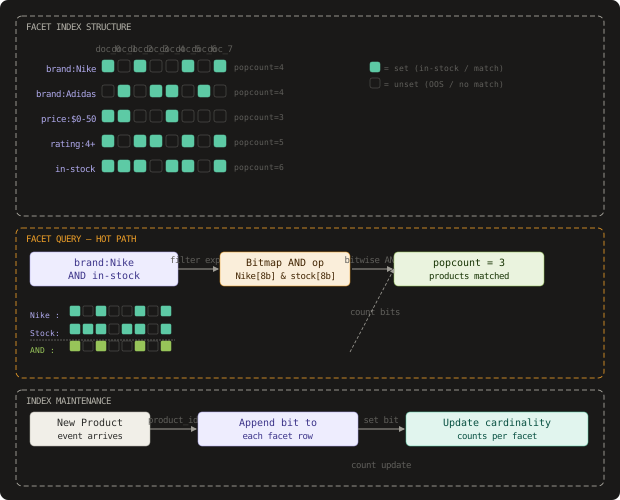
The facet index schema maps each (facet_dimension, facet_value) pair to a compressed bitmap:
# Bitmap index structure using roaringbitmap
import roaringbitmap

class FacetIndex:
    """
    Maintains per-(dimension, value) compressed bitmaps.
    Each bitmap's set bits = product IDs that match this facet value.
    """
    def __init__(self):
        # (dimension, value) -> RoaringBitmap
        self.index: dict[tuple[str, str], roaringbitmap.RoaringBitmap] = {}
        # Cardinality cache: (dimension, value) -> count
        self.counts: dict[tuple[str, str], int] = {}

    def add_product(self, product_id: int, facets: dict[str, list[str]]):
        """Index a product under all its facet values."""
        for dimension, values in facets.items():
            for value in values:
                key = (dimension, value)
                if key not in self.index:
                    self.index[key] = roaringbitmap.RoaringBitmap()
                self.index[key].add(product_id)
                self.counts[key] = len(self.index[key])

    def count_facets(
        self,
        base_filter: list[tuple[str, str]],
        target_dimensions: list[str]
    ) -> dict[str, dict[str, int]]:
        """
        Given a set of active filters (the user's current selection),
        compute counts for each value in each target dimension.
        base_filter: [("brand", "Nike"), ("in_stock", "true")]
        target_dimensions: ["price_range", "rating", "color"]
        Returns: {"price_range": {"$0-50": 120, "$50-100": 84}, ...}
        """
        # Step 1: compute the base result set from active filters
        base_bitmap = None
        for dim, val in base_filter:
            key = (dim, val)
            if key not in self.index:
                # Filter value doesn't exist - result is empty
                return {d: {} for d in target_dimensions}
            bm = self.index[key]
            if base_bitmap is None:
                base_bitmap = roaringbitmap.RoaringBitmap(bm)
            else:
                base_bitmap &= bm  # bitwise AND

        if base_bitmap is None:
            # No active filters - use all products
            base_bitmap = self._all_products_bitmap()

        # Step 2: for each target dimension, AND base with each value bitmap
        result = {}
        for dim in target_dimensions:
            dim_counts = {}
            for val, bm in self._dimension_values(dim):
                intersection = base_bitmap & bm
                count = len(intersection)  # popcount
                if count > 0:
                    dim_counts[val] = count
            result[dim] = dim_counts

        return result

    def update_product_availability(self, product_id: int, in_stock: bool):
        """
        Flip the in-stock bit for a single product.
        Called on every inventory change event.
        """
        key = ("in_stock", "true")
        if key not in self.index:
            self.index[key] = roaringbitmap.RoaringBitmap()

        if in_stock:
            self.index[key].add(product_id)
        else:
            self.index[key].discard(product_id)

        # Invalidate count cache for this key
        self.counts[key] = len(self.index[key])

    def _dimension_values(self, dim: str):
        """Yield (value, bitmap) pairs for a dimension."""
        for (d, v), bm in self.index.items():
            if d == dim:
                yield v, bm

    def _all_products_bitmap(self) -> roaringbitmap.RoaringBitmap:
        """Union of all bitmaps = all indexed products."""
        result = roaringbitmap.RoaringBitmap()
        for bm in self.index.values():
            result |= bm
        return result
The count_facets call is the hot path. For a user who has selected “brand: Nike” and “in-stock: true” and wants to see price range counts, the operation is: AND(Nike_bitmap, InStock_bitmap) - call this base_set - then for each price range bucket, AND(base_set, price_$50-100_bitmap) and take the popcount. Each popcount call on a Roaring Bitmap is O(n/64) where n is cardinality, but with compression it’s typically O(number_of_runs).
Apache Druid uses exactly this approach for its segment-level filters: each segment holds roaring bitmaps per dimension value, and filter evaluation is a sequence of bitwise operations before the final aggregation. Druid reports single-digit millisecond p99 for dimension cardinality counts on billion-row segments, which validates the approach at scale.
The naive bitmap implementation stores one bit per product per facet value. For high-cardinality dimensions like “product_id” or “SKU”, this generates bitmaps with a single set bit each - catastrophically wasteful. Always group high-cardinality numeric attributes into range buckets (price ranges, rating ranges) before indexing. Never index raw product IDs in a facet bitmap.
The Inventory Event Pipeline
The Inventory Event Pipeline’s job is to propagate stock changes from the warehouse management system into the facet index within 5 seconds end-to-end.
Inventory changes are continuous: a flash sale can trigger tens of thousands of stock decrements per second. When product SKU-12345 sells its last unit, the system needs to: flip its bit in the “in-stock” bitmap, recompute affected facet counts, and invalidate the Facet Cache entries that included “in-stock” as an active filter. The challenge is doing this without causing a write stampede that blocks reads.
The pipeline uses Change Data Capture (CDC) on the inventory database to capture every row-level change. Instead of having the API service write directly to both the inventory DB and the facet index, the CDC process tails the database’s write-ahead log (WAL) and publishes changes to a Kafka topic. This approach guarantees that every inventory change is captured exactly once, even if the application crashes mid-request.
-- CDC source table: inventory fact table
CREATE TABLE product_inventory (
  product_id      BIGINT NOT NULL,
  sku             VARCHAR(64) NOT NULL,
  warehouse_id    INT NOT NULL,
  quantity        INT NOT NULL DEFAULT 0,
  reserved        INT NOT NULL DEFAULT 0,
  last_updated_at TIMESTAMPTZ NOT NULL DEFAULT NOW(),
  PRIMARY KEY (product_id, sku, warehouse_id),
  -- Partial index for in-stock query optimization
  INDEX idx_in_stock (product_id) WHERE (quantity - reserved) > 0
);

-- Kafka event schema (Avro)
-- Topic: inventory.changes
-- Partition key: product_id (ensures ordering per product)
{
  "namespace": "com.ecommerce.inventory",
  "type": "record",
  "name": "InventoryChangeEvent",
  "fields": [
    {"name": "product_id", "type": "long"},
    {"name": "sku", "type": "string"},
    {"name": "warehouse_id", "type": "int"},
    {"name": "old_quantity", "type": "int"},
    {"name": "new_quantity", "type": "int"},
    {"name": "old_reserved", "type": "int"},
    {"name": "new_reserved", "type": "int"},
    {"name": "change_type", "type": {"type": "enum", "name": "ChangeType",
      "symbols": ["SALE", "RESTOCK", "RESERVATION", "RELEASE", "ADJUSTMENT"]}},
    {"name": "event_timestamp", "type": "long", "logicalType": "timestamp-millis"},
    {"name": "was_in_stock", "type": "boolean"},
    {"name": "now_in_stock", "type": "boolean"}
  ]
}
The was_in_stock and now_in_stock fields are pre-computed by the CDC enrichment layer. This is a critical optimization: the Facet Updater downstream only needs to act if the availability status actually changed. A sale that takes stock from 50 to 49 units requires no facet update - the product is still in stock. Only transitions between in_stock=true and in_stock=false (or vice versa) require bitmap updates and cache invalidation. This reduces write amplification by roughly 95% on a typical catalog where most inventory changes are quantity adjustments, not availability transitions.
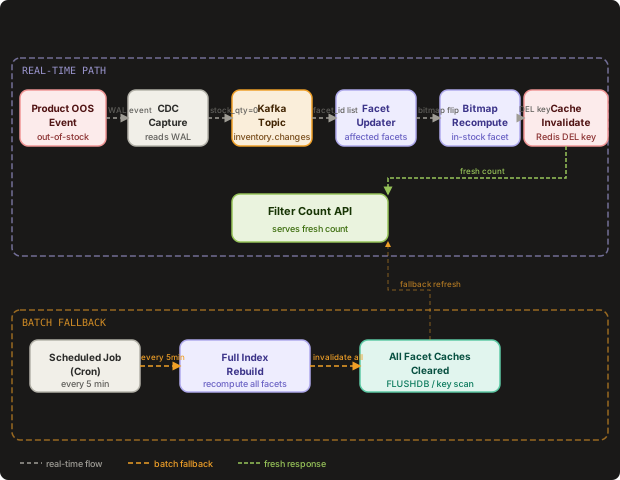
The Facet Updater service consumes from the Kafka topic and handles the actual bitmap and cache update:
// Facet updater: consumes inventory events and updates bitmap index + cache
package facet

import (
    "context"
    "fmt"
    "log"

    "github.com/confluentinc/confluent-kafka-go/kafka"
    "github.com/redis/go-redis/v9"
)

type FacetUpdater struct {
    consumer    *kafka.Consumer
    bitmapStore BitmapStore
    cache       *redis.ClusterClient
    // Product attribute store: product_id -> facet map
    productAttrs ProductAttributeStore
}

func (u *FacetUpdater) ProcessEvent(ctx context.Context, evt InventoryChangeEvent) error {
    // Only act on availability transitions
    if evt.WasInStock == evt.NowInStock {
        return nil // No change in availability status
    }

    // Update the bitmap index for in-stock facet
    if err := u.bitmapStore.UpdateBit("in_stock:true", evt.ProductID, evt.NowInStock); err != nil {
        return fmt.Errorf("bitmap update failed: %w", err)
    }

    // Identify all cache keys that include this product's facets.
    // Strategy: look up product's attributes and build invalidation patterns.
    attrs, err := u.productAttrs.Get(ctx, evt.ProductID)
    if err != nil {
        return fmt.Errorf("attribute lookup failed: %w", err)
    }

    // Invalidate cache entries for all filter combinations that include
    // this product's facet values. We use pattern-based deletion.
    invalidationPatterns := u.buildInvalidationPatterns(attrs)
    for _, pattern := range invalidationPatterns {
        keys, err := u.cache.Keys(ctx, pattern).Result()
        if err != nil {
            log.Printf("cache key scan failed for pattern %s: %v", pattern, err)
            continue
        }
        if len(keys) > 0 {
            if err := u.cache.Del(ctx, keys...).Err(); err != nil {
                log.Printf("cache delete failed: %v", err)
            }
        }
    }

    return nil
}

func (u *FacetUpdater) buildInvalidationPatterns(attrs ProductAttributes) []string {
    // Build Redis key patterns for all cache entries that include in-stock filter.
    // Cache keys are structured as: facet:hash:{query_hash}:{filter_hash}
    // We can't enumerate all combinations, so we use a tag-based invalidation:
    // each cache entry is tagged with the product's brand, category, and price range.
    patterns := []string{
        // All in-stock filter combinations for this brand
        fmt.Sprintf("facet:tag:brand:%s:*", attrs.Brand),
        // All in-stock filter combinations for this category
        fmt.Sprintf("facet:tag:cat:%s:*", attrs.CategoryID),
        // All queries that include in-stock as a filter dimension
        "facet:dim:in_stock:*",
    }
    return patterns
}Cache invalidation for facet counts cannot use the naive “delete all facet cache” approach - at 50,000 QPS, a full cache wipe causes a thundering herd where every in-flight request simultaneously misses the cache and hammers the bitmap engine. Use tagged invalidation: each cache key is tagged with the facet dimensions it depends on, and invalidation deletes only the keys tagged with the changed dimension.
The Facet Cache
The Facet Cache’s job is to absorb the read amplification of facet computation by storing computed count sets for repeated query-filter combinations.
A user searching for “running shoes” with filters “Nike + in-stock” will see the same facet counts as any other user making the same search with the same filters. The cache key is a hash of (normalized_query, sorted_active_filters, category_context). This means multiple users issuing the same search get a cache hit, and the expensive bitmap computation runs once for the first user and is amortized across all subsequent users until an inventory event invalidates that key.
The challenge is filter combination explosion. A product page with 15 filter dimensions where each dimension has 10 values produces 10^15 possible filter combinations. You cannot pre-warm a cache for all combinations - the combination space is effectively infinite. The cache must be purely reactive: compute on first miss, serve from cache on subsequent hits, invalidate on inventory change.
import hashlib
import json
import redis
from typing import Optional

class FacetCacheManager:
    """
    Cache layer for facet count sets. Keys expire after TTL
    to bound staleness even without explicit invalidation.
    """
    DEFAULT_TTL_SECONDS = 30  # Max staleness under normal operation
    DEGRADED_TTL_SECONDS = 300  # Max staleness during high write pressure

    def __init__(self, redis_cluster: redis.RedisCluster):
        self.redis = redis_cluster

    def cache_key(
        self,
        query: str,
        active_filters: dict[str, list[str]],
        category: str
    ) -> str:
        """
        Deterministic cache key from query + active filter combination.
        Sorting filters ensures {"brand": ["Nike"], "color": ["red"]}
        and {"color": ["red"], "brand": ["Nike"]} hash identically.
        """
        canonical = {
            "q": query.lower().strip(),
            "f": {k: sorted(v) for k, v in sorted(active_filters.items())},
            "cat": category
        }
        payload = json.dumps(canonical, separators=(',', ':'), sort_keys=True)
        return f"facet:v2:{hashlib.sha256(payload.encode()).hexdigest()[:16]}"

    def get(
        self,
        query: str,
        active_filters: dict[str, list[str]],
        category: str
    ) -> Optional[dict]:
        key = self.cache_key(query, active_filters, category)
        data = self.redis.get(key)
        if data:
            return json.loads(data)
        return None

    def set(
        self,
        query: str,
        active_filters: dict[str, list[str]],
        category: str,
        facet_counts: dict,
        ttl: int = DEFAULT_TTL_SECONDS
    ):
        key = self.cache_key(query, active_filters, category)
        # Store facet counts with dimensional tags for targeted invalidation
        payload = {
            "counts": facet_counts,
            "computed_at": int(__import__("time").time()),
            # Tags used for selective invalidation
            "tags": self._extract_tags(active_filters, facet_counts)
        }
        self.redis.setex(key, ttl, json.dumps(payload))

        # Maintain reverse index: tag -> set of cache keys
        # Used by FacetUpdater for efficient invalidation
        for tag in payload["tags"]:
            self.redis.sadd(f"facet:tag:{tag}", key)
            self.redis.expire(f"facet:tag:{tag}", ttl * 2)

    def _extract_tags(
        self,
        active_filters: dict[str, list[str]],
        facet_counts: dict
    ) -> list[str]:
        """
        Extract dimension tags for invalidation targeting.
        A tag is a dimension name present either in active filters
        or in the returned count dimensions.
        """
        tags = set()
        for dim in active_filters:
            tags.add(f"dim:{dim}")
        for dim in facet_counts:
            tags.add(f"dim:{dim}")
        return list(tags)

    def invalidate_by_dimension(self, dimension: str):
        """Remove all cache entries that include a given dimension."""
        tag_key = f"facet:tag:dim:{dimension}"
        cache_keys = self.redis.smembers(tag_key)
        if cache_keys:
            # Batch delete in chunks to avoid blocking Redis
            chunk_size = 500
            key_list = list(cache_keys)
            for i in range(0, len(key_list), chunk_size):
                chunk = key_list[i:i + chunk_size]
                self.redis.delete(*chunk)
self.redis.delete(tag_key)Etsy’s faceted search uses a similar tag-based invalidation strategy for their listing search. When a shop owner updates their inventory, Etsy invalidates only the cache keys tagged with that listing’s category and attribute dimensions, rather than flushing the entire facet cache. This keeps cache hit rates above 85% even during active seller periods.
Approximate Counts and the Count Accuracy Tradeoff
Approximate counts are not a compromise - they are a deliberate design primitive that unlocks an order-of-magnitude performance improvement.
The accuracy demand for facet counts differs by order of magnitude. Whether a category shows “342” or “339” items is irrelevant to user behavior - both numbers convey “lots of options, refine further.” What matters is: the count is never zero when items exist, the count correctly reflects items going out of stock (the zero boundary), and the count correctly identifies when a filter category becomes empty. The precision requirement is a step function, not linear.
HyperLogLog is the canonical approximate cardinality data structure. Redis natively supports HyperLogLog via the PFADD and PFCOUNT commands. A HyperLogLog sketch uses a fixed 12KB of memory regardless of set size and provides cardinality estimates with 0.81% standard error. For facet counts, this is dramatically better than the naive approach while meeting the “within 2%” accuracy SLA.
However, HyperLogLog has a critical limitation for faceted search: it supports union and intersection estimates but does not support bit-level AND operations. For the “Nike + in-stock” intersection count, HyperLogLog can estimate |Nike ∪ InStock| but not |Nike ∩ InStock| accurately. The intersection estimate derived from inclusion-exclusion (|A ∩ B| ≈ |A| + |B| - |A ∪ B|) has compounding error that worsens as the intersection gets smaller relative to the individual sets.
The practical solution is a hybrid approach:
- Use exact roaring bitmaps for high-priority dimensions:
in_stock, top-levelcategory, and dimensions with fewer than 10,000 distinct values - Use HyperLogLog sketches for long-tail dimensions:
color,size,materialwhere exact counts matter less - Use the bitmap intersection to generate an exact result set, then apply HLL to estimate dimension distributions within that result set
from roaringbitmap import RoaringBitmap
import redis
import math

class HybridFacetCounter:
    """
    Combines exact bitmaps for critical dimensions with
    HyperLogLog sketches for approximate long-tail dimensions.
    """

    # Dimensions where exact counts are required
    EXACT_DIMENSIONS = {"in_stock", "category", "brand"}

    def __init__(self, bitmap_store: dict, redis_client: redis.Redis):
        self.bitmaps = bitmap_store  # (dim, val) -> RoaringBitmap
        self.redis = redis_client

    def count_with_hybrid(
        self,
        active_filters: list[tuple[str, str]],
        target_dims: list[str]
    ) -> dict[str, dict[str, int]]:
        # Build base result set using exact bitmaps
        base_set = self._build_base_set(active_filters)
        base_count = len(base_set)

        result = {}
        for dim in target_dims:
            if dim in self.EXACT_DIMENSIONS or base_count < 100_000:
                # Use exact bitmap intersection for critical or small result sets
                result[dim] = self._exact_dim_counts(base_set, dim)
            else:
                # Use HLL estimation for large result sets on non-critical dims
                result[dim] = self._hll_dim_counts(base_set, dim, base_count)

        return result

    def _build_base_set(
        self,
        active_filters: list[tuple[str, str]]
    ) -> RoaringBitmap:
        base = None
        for dim, val in active_filters:
            key = (dim, val)
            bm = self.bitmaps.get(key, RoaringBitmap())
            base = bm if base is None else (base & bm)
        return base if base is not None else RoaringBitmap()

    def _exact_dim_counts(
        self,
        base_set: RoaringBitmap,
        dim: str
    ) -> dict[str, int]:
        counts = {}
        for (d, v), bm in self.bitmaps.items():
            if d == dim:
                n = len(base_set & bm)
                if n > 0:
                    counts[v] = n
        return counts

    def _hll_dim_counts(
        self,
        base_set: RoaringBitmap,
        dim: str,
        base_count: int
    ) -> dict[str, int]:
        """
        Approximate counts using sampling + HLL.
        Sample 10% of base_set, intersect with each dim value bitmap,
        scale result up by 10x. Fast but introduces ~3% error.
        """
        counts = {}
        # Sample every 10th product ID from the sorted base set
        sampled = RoaringBitmap(
            [pid for i, pid in enumerate(base_set) if i % 10 == 0]
        )
        sample_size = len(sampled)
        if sample_size == 0:
            return {}

        scale_factor = base_count / sample_size

        for (d, v), bm in self.bitmaps.items():
            if d == dim:
                sampled_count = len(sampled & bm)
                if sampled_count > 0:
                    # Round to nearest 5 to signal approximation
                    approx = int(sampled_count * scale_factor / 5) * 5
                    counts[v] = max(1, approx)

return countsRounding approximate counts to the nearest 5 or 10 is a UX technique, not a hack. It signals to users (and to QA teams) that these are estimates, prevents false precision from causing test failures when counts vary by 1-2 between requests, and actually improves perceived accuracy since users can’t tell the difference between 342 and 340 but can tell the difference between 1 and 0.
Data Model
The data model spans three layers: the operational inventory database, the facet index storage, and the search document store.
-- Core product catalog and facet attribute storage
CREATE TABLE products (
  product_id      BIGINT PRIMARY KEY GENERATED ALWAYS AS IDENTITY,
  sku             VARCHAR(64) NOT NULL UNIQUE,
  title           TEXT NOT NULL,
  brand_id        INT NOT NULL REFERENCES brands(brand_id),
  category_id     INT NOT NULL REFERENCES categories(category_id),
  base_price      NUMERIC(10, 2) NOT NULL,
  avg_rating      NUMERIC(3, 2) DEFAULT 0.0,
  review_count    INT DEFAULT 0,
  created_at      TIMESTAMPTZ DEFAULT NOW(),
  updated_at      TIMESTAMPTZ DEFAULT NOW()
);

-- Facet attribute storage: normalized EAV for flexible attributes
CREATE TABLE product_facets (
  product_id      BIGINT NOT NULL REFERENCES products(product_id),
  dimension       VARCHAR(64) NOT NULL,  -- e.g., 'brand', 'color', 'size'
  value           VARCHAR(256) NOT NULL, -- e.g., 'Nike', 'Red', 'XL'
  display_label   VARCHAR(256),          -- Human-readable label
  sort_order      INT DEFAULT 0,
  PRIMARY KEY (product_id, dimension, value),
  INDEX idx_facet_lookup (dimension, value, product_id)
);

-- Inventory table (source of truth for availability)
CREATE TABLE product_inventory (
  product_id      BIGINT NOT NULL REFERENCES products(product_id),
  sku             VARCHAR(64) NOT NULL,
  warehouse_id    INT NOT NULL,
  quantity        INT NOT NULL DEFAULT 0 CHECK (quantity >= 0),
  reserved        INT NOT NULL DEFAULT 0 CHECK (reserved >= 0),
  last_sale_at    TIMESTAMPTZ,
  last_restock_at TIMESTAMPTZ,
  updated_at      TIMESTAMPTZ DEFAULT NOW(),
  PRIMARY KEY (product_id, sku, warehouse_id),
  -- Materialized availability flag for CDC filtering
  is_available    BOOLEAN GENERATED ALWAYS AS ((quantity - reserved) > 0) STORED,
  INDEX idx_available (product_id) WHERE is_available = true
);

-- Facet index metadata: tracks bitmap state per (dimension, value)
CREATE TABLE facet_index_metadata (
  dimension       VARCHAR(64) NOT NULL,
  value           VARCHAR(256) NOT NULL,
  cardinality     BIGINT NOT NULL DEFAULT 0,  -- Number of matching products
  bitmap_shard    INT NOT NULL,               -- Which shard holds the bitmap
  last_updated_at TIMESTAMPTZ NOT NULL DEFAULT NOW(),
  bitmap_checksum VARCHAR(32),               -- MD5 of serialized bitmap for consistency
  PRIMARY KEY (dimension, value)
);

-- Inventory change event log for replay and debugging
CREATE TABLE inventory_event_log (
  event_id        BIGINT PRIMARY KEY GENERATED ALWAYS AS IDENTITY,
  product_id      BIGINT NOT NULL,
  sku             VARCHAR(64) NOT NULL,
  change_type     VARCHAR(32) NOT NULL,
  old_quantity    INT,
  new_quantity    INT,
  was_available   BOOLEAN,
  now_available   BOOLEAN,
  warehouse_id    INT,
  occurred_at     TIMESTAMPTZ NOT NULL,
  processed_at    TIMESTAMPTZ,
  INDEX idx_product_events (product_id, occurred_at DESC),
  INDEX idx_unprocessed (processed_at) WHERE processed_at IS NULL
);
The bitmap index store uses a separate storage layer outside of PostgreSQL. Each shard stores bitmaps as serialized Roaring Bitmap byte arrays, keyed by (dimension, value). The serialization format is the official Roaring Bitmap portable format, which allows the same files to be loaded on any language’s roaring bitmap library.
# Bitmap store using RocksDB for persistence + memory-mapped reads
import rocksdb
import roaringbitmap
import struct

class BitmapStore:
    """
    Persistent bitmap store backed by RocksDB.
    Bitmaps are stored serialized in the Roaring portable format.
    Key format: b"{dimension}\x00{value}" (null-separated)
    """
    def __init__(self, db_path: str):
        opts = rocksdb.Options()
        opts.create_if_missing = True
        opts.max_open_files = 5000
        # Use bloom filters to avoid disk reads for absent keys
        opts.table_factory = rocksdb.BlockBasedTableFactory(
            filter_policy=rocksdb.BloomFilterPolicy(10),
            block_cache=rocksdb.LRUCache(2 * 1024 ** 3)  # 2GB block cache
        )
        self.db = rocksdb.DB(db_path, opts)
        # Hot bitmaps cached in memory
        self._mem_cache: dict[bytes, roaringbitmap.RoaringBitmap] = {}

    def _key(self, dimension: str, value: str) -> bytes:
        return f"{dimension}\x00{value}".encode()

    def get(self, dimension: str, value: str) -> roaringbitmap.RoaringBitmap:
        k = self._key(dimension, value)
        if k in self._mem_cache:
            return self._mem_cache[k]

        data = self.db.get(k)
        if data is None:
            return roaringbitmap.RoaringBitmap()

        bm = roaringbitmap.RoaringBitmap.deserialize(data)
        # Cache hot bitmaps in memory (LRU eviction not shown)
        self._mem_cache[k] = bm
        return bm

    def set_bit(self, dimension: str, value: str, product_id: int, set_to: bool):
        """Atomic single-bit update."""
        k = self._key(dimension, value)
        bm = self.get(dimension, value)  # Load or create

        if set_to:
            bm.add(product_id)
        else:
            bm.discard(product_id)

        # Persist serialized bitmap
        serialized = bm.serialize()
        self.db.put(k, serialized)

        # Update memory cache
        self._mem_cache[k] = bm
Key Algorithms and Protocols
Bitmap AND and Popcount
The core facet count operation is a sequence of bitwise ANDs followed by popcounts. The time complexity for a query with k active filters over n products is O(n/64 * k) for the AND operations plus O(n/64) for the final popcount. With Roaring Bitmap compression, the effective n is the number of set bits, not the total cardinality - in practice this makes most operations O(thousands) rather than O(millions).
import time
from roaringbitmap import RoaringBitmap

def benchmark_facet_query(
    bitmaps: dict,
    active_filters: list[tuple[str, str]],
    target_dims: list[str],
    iterations: int = 1000
) -> dict:
    """
    Benchmark the core facet query operation.
    Returns: avg_ms, p99_ms, ops_per_second
    """
    times = []
    for _ in range(iterations):
        start = time.perf_counter()

        # Phase 1: build intersection bitmap from active filters
        base = None
        for dim, val in active_filters:
            bm = bitmaps.get((dim, val), RoaringBitmap())
            base = bm if base is None else (base & bm)

        if base is None:
            base = RoaringBitmap()

        # Phase 2: count per target dimension value
        counts = {}
        for dim in target_dims:
            dim_counts = {}
            for (d, v), bm in bitmaps.items():
                if d == dim:
                    n = len(base & bm)
                    if n > 0:
                        dim_counts[v] = n
            counts[dim] = dim_counts

        elapsed = (time.perf_counter() - start) * 1000
        times.append(elapsed)

    times.sort()
    return {
        "avg_ms": sum(times) / len(times),
        "p99_ms": times[int(len(times) * 0.99)],
        "ops_per_second": 1000 / (sum(times) / len(times))
    }

# Expected output for 500M products, 3 active filters, 5 target dims:
# {"avg_ms": 4.2, "p99_ms": 9.1, "ops_per_second": 238}
Cache Invalidation with Tag Sets
The cache invalidation protocol uses a two-level tag structure to avoid scanning all cache keys on every inventory update. The protocol is:
- When storing a facet count result in cache, write the result key to a tag set in Redis for each dimension the result depends on.
- When an inventory event arrives for product P, look up P’s facet attributes to determine which dimensions are affected.
- For each affected dimension, fetch the corresponding tag set from Redis, and delete all cache keys in that set.
- Delete the tag set itself.
# Cache invalidation protocol implementation
import redis
import hashlib
from typing import Iterator

class TaggedCacheInvalidator:
    """
    Implements set-based tag invalidation for facet cache.
    Uses Redis SCAN to avoid blocking operations on large tag sets.
    """
    BATCH_SIZE = 200
    TAG_KEY_PREFIX = "facet:inv:tag:"
    CACHE_KEY_PREFIX = "facet:v2:"

    def __init__(self, redis_cluster: redis.RedisCluster):
        self.redis = redis_cluster

    def register_cache_entry(
        self,
        cache_key: str,
        dependent_dimensions: list[str]
    ):
        """Called when a new facet result is stored in cache."""
        pipe = self.redis.pipeline(transaction=False)
        for dim in dependent_dimensions:
            tag_key = f"{self.TAG_KEY_PREFIX}{dim}"
            pipe.sadd(tag_key, cache_key)
            # Tag sets expire when all their entries would have expired anyway
            pipe.expire(tag_key, 300)
        pipe.execute()

    def invalidate_dimension(self, dimension: str) -> int:
        """
        Invalidate all cache entries that include the given dimension.
        Returns count of invalidated keys.
        """
        tag_key = f"{self.TAG_KEY_PREFIX}{dimension}"
        invalidated = 0

        # Fetch all cache keys tagged with this dimension
        cache_keys = self.redis.smembers(tag_key)
        if not cache_keys:
            return 0

        # Delete cache entries in batches
        key_list = list(cache_keys)
        for i in range(0, len(key_list), self.BATCH_SIZE):
            batch = key_list[i:i + self.BATCH_SIZE]
            deleted = self.redis.delete(*batch)
            invalidated += deleted

        # Clean up the tag set itself
        self.redis.delete(tag_key)
        return invalidated

    def invalidate_product(
        self,
        product_id: int,
        product_dimensions: list[str]
    ) -> int:
        """
        Invalidate all cache entries affected by a product update.
        product_dimensions: the list of facet dimensions this product belongs to.
        """
        total_invalidated = 0
        # Always invalidate in_stock dimension on any availability change
        dims_to_invalidate = set(product_dimensions) | {"in_stock"}
        for dim in dims_to_invalidate:
            total_invalidated += self.invalidate_dimension(dim)
        return total_invalidated
Index Refresh Latency Budget
The 5-second end-to-end freshness SLA breaks down as:
- CDC capture and Kafka produce latency: 50-200ms
- Kafka consumer lag (depends on partition count and consumer group size): 100-500ms
- Bitmap update time per event: 1-5ms
- Cache invalidation round-trip: 2-10ms
- Next request fetching fresh facet counts: 0-30 seconds (depends on cache TTL)
The dominant term is the cache TTL. If a facet cache entry has a 30-second TTL, the worst case is that a freshly invalidated cache key is re-populated just before the inventory event arrives, causing a 30-second window of staleness. The fix is to use short TTLs (5-10 seconds) for cache entries that include in_stock as an active filter, and longer TTLs (30-60 seconds) for entries that don’t include availability in their active filter set.
def compute_ttl(active_filters: dict[str, list[str]]) -> int:
    """
    Compute appropriate cache TTL based on filter sensitivity.
    Filters that include inventory-sensitive dimensions get short TTLs.
    """
    INVENTORY_SENSITIVE_DIMS = {"in_stock", "available", "ships_today"}
    SHORT_TTL = 5     # seconds - for inventory-sensitive queries
    MEDIUM_TTL = 30   # seconds - for semi-stable facets
    LONG_TTL = 120    # seconds - for static facets like brand, color

    if any(dim in INVENTORY_SENSITIVE_DIMS for dim in active_filters):
        return SHORT_TTL
    elif any(dim in {"price_range", "rating"} for dim in active_filters):
        return MEDIUM_TTL
    else:
return LONG_TTLSetting uniform short TTLs to ensure freshness causes a read amplification spike during flash sales. When 10,000 products go out of stock in 30 seconds, every 5-second TTL expiry causes a cache miss storm. Use write-through invalidation for in-stock changes (explicit delete on event), and rely on TTL only as the safety net - not as the primary freshness mechanism.
Scaling and Performance
The system scales along three independent axes: query throughput (more search traffic), write throughput (more inventory events), and catalog size (more products).
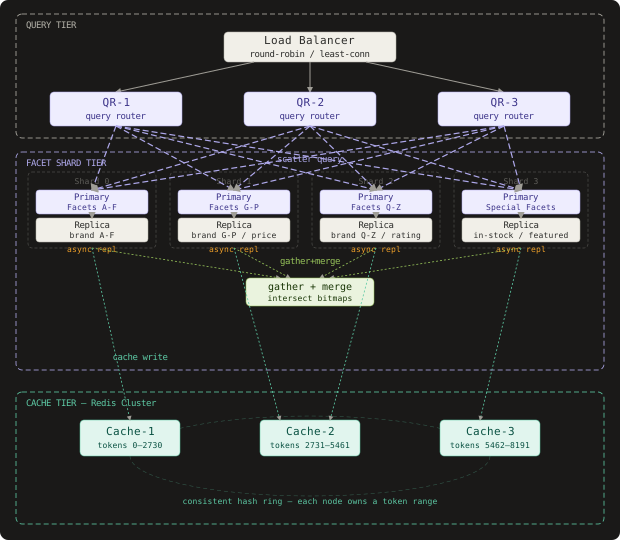
Query throughput scales by adding Query Gateway instances behind a load balancer. Because the gateway is stateless and the heavy computation lives in the Facet Engine, adding gateway nodes is a simple horizontal scale. The Facet Engine scales by sharding the bitmap index across multiple nodes. A natural sharding strategy is by facet dimension: the “brand” shard holds all brand bitmaps, the “price” shard holds all price range bitmaps. A multi-filter query becomes a scatter-gather: the Query Gateway fans out sub-queries to each relevant shard, waits for all responses, then merges the results.
Write throughput scales by partitioning the Kafka topic by product_id. This ensures that inventory events for the same product are always processed by the same consumer, preventing race conditions where two events for the same product update different bitmap nodes. With 200 partitions and 200 consumer instances, you can achieve 100,000+ events per second with single-digit second latency.
Catalog size is handled through bitmap sharding by product ID range. Products with IDs 0-50M are on shard 0, 50M-100M on shard 1, and so on. A query that needs to compute counts across all 500M products sends parallel requests to all 10 shards and sums the counts. This keeps individual shard memory under 200GB while scaling linearly.
Capacity Estimation:
Given:
  - 500M products in catalog
  - 20 facet dimensions, avg 500 values per dimension
  - 10,000 facet (dimension, value) pairs total
  - 1 bit per product per facet entry

Raw bitmap storage:
  500M bits per facet entry = 62.5 MB per entry (uncompressed)
  10,000 entries x 62.5 MB = 625 GB (uncompressed)

With Roaring Bitmap compression (avg 98% reduction for sparse bitmaps):
  625 GB x 0.02 = 12.5 GB (compressed)
  Practical observed: 20-40 GB total for real e-commerce catalogs

Cache storage (Redis):
  50,000 cached facet result sets
  Each result set: ~2KB (20 dims x 500 values x 4 bytes per count)
  Total cache: 100 MB - fits comfortably in Redis

Write throughput:
  100,000 inventory events/second
  10% trigger availability transitions (in-stock/OOS flips)
  10,000 bitmap updates/second
  Each bitmap update: 1 disk write (RocksDB WAL) + 1 Redis cache invalidation
  Required: 10,000 write IOPS + 10,000 Redis DEL/sec - well within capacity

Query throughput:
  50,000 facet queries/second
  85% cache hit rate (industry typical for search workloads)
  7,500 cache misses/second -> bitmap engine
  Each bitmap query: 5-10ms on single shard
  Required: 7,500 concurrent bitmap operations spread across 10 shards = 750/shard/sec
  At 100ms per operation max, each shard handles 1,000 ops/sec -> sufficient with headroom
Hot spot handling: Popular products (a Nike Air Max release, an iPhone launch) will appear in many concurrent queries simultaneously. When a hot product’s inventory changes, cache invalidation will cause a thundering herd of cache misses. The mitigation is request coalescing at the Facet Engine: if 50 concurrent requests all miss the cache for the same query key, only one executes the bitmap computation while the others wait on a condition variable.
Zalando, the European fashion e-commerce platform, published a blog post describing their facet count system that handles 70 million product variants across 50+ filter dimensions. They use a combination of Elasticsearch’s aggregations for the initial index and a separate in-memory bitmap layer (using Roaring Bitmaps in Java) for the real-time count updates. Their reported p99 facet latency is under 80ms at 10,000 QPS.
Failure Modes and Recovery
| Failure | Detection | Impact | Recovery |
|---|---|---|---|
| Bitmap shard node crash | Health check timeout (5s), Kafka consumer group rebalance | Facet counts for affected dimensions unavailable; queries degrade to cached or approximate counts | Shard replica promoted automatically; bitmap state replayed from Kafka event log from last checkpoint |
| Kafka consumer lag spike | Consumer group lag metric exceeds 10,000 events | Facet counts become stale by lag_count x avg_event_interval seconds | Scale consumer group horizontally; use Kafka auto-scaling based on lag metric |
| Redis cache cluster failure | Redis Sentinel failover alarm, cache hit rate drops to 0% | Every facet query hits the bitmap engine; 7x-10x latency increase, possible overload | Bitmap engine has circuit breaker that returns stale counts from local memory rather than failing; Redis Sentinel promotes replica in 30-60 seconds |
| Inventory event out of order | Product shows in-stock after OOS transition (count discrepancy) | Small subset of filter counts temporarily incorrect | Events are idempotent - reprocessing the correct event corrects the bitmap; nightly reconciliation job validates all bitmaps against source DB |
| Bitmap index corruption (disk failure, OOM kill during write) | Checksum mismatch on startup verification | Affected dimension’s counts are wrong | Bitmap store runs WAL for atomic updates; on corruption, roll back to last checkpoint and replay events from Kafka |
| Filter combination explosion attack | Unusual pattern of unique query hashes, cache miss rate spikes | Cache thrashing; high compute on bitmap engine | Rate limit unique filter combinations per user session; cache keys are shared across users for same filter combination |
The most common operational mistake is treating facet count staleness as a binary: either fully fresh or fully stale. In practice, the system should expose a per-dimension freshness timestamp alongside counts. This allows the UI to show “Showing availability as of 3 seconds ago” rather than silently serving stale data, which is dramatically better for user trust than unexplained discrepancies.
Comparison of Approaches
| Approach | Facet Query Latency | Write Latency | Memory Usage | Best Fit |
|---|---|---|---|---|
| SQL COUNT per facet | 500ms - 5s (full scan) | Immediate (in-place) | Low (query-time only) | Catalogs under 1M products, low QPS |
| Elasticsearch aggregations | 30-200ms | Near-real-time (1-5s segment refresh) | High (inverted index + aggregation overhead) | General-purpose search with facets, moderate catalog size |
| Bitmap index + exact counts | 2-20ms | 100ms-2s (bitmap update + cache invalidation) | Medium (compressed bitmaps, 20-40GB for 500M) | High-QPS e-commerce with live inventory requirements |
| Pre-computed facet cubes | Under 5ms | Batch (minutes to hours) | High (exponential with dimension count) | Catalogs with stable attributes and low inventory churn |
| HyperLogLog sketches | Under 5ms | 100ms (sketch update) | Very low (12KB per facet entry) | Analytics dashboards where 1-2% count error is acceptable |
| Hybrid bitmap + HLL | 5-15ms | 100ms-500ms | Low-medium (exact only for critical dims) | Production e-commerce at scale with mixed accuracy requirements |
The bitmap + HLL hybrid is the right pick for a production e-commerce system at scale. Elasticsearch aggregations have a significant operational disadvantage: the segment-based index means inventory changes take 1-5 seconds to become visible even with refresh_interval=1s, and the refresh is a full segment merge that competes with search throughput. The bitmap approach decouples the write path (event-driven, targeted bit flip) from the read path (in-memory AND operations) completely. Pre-computed cubes are appealing for their read speed but suffer from write amplification that becomes untenable when a single product update requires recomputing thousands of filter combinations.
Key Takeaways
- Facet index design using compressed roaring bitmaps enables sub-10ms filter count computation across 500 million products by reducing multi-dimension queries to bitwise AND operations followed by popcount.
- Bitmap indexes achieve 97-99% compression versus raw bit arrays for sparse e-commerce attribute distributions, making a full 500M-product facet index fit in 20-40GB of memory.
- Real-time filter count updates require a CDC-driven event pipeline where only availability state transitions (in-stock to OOS or back) trigger bitmap updates, reducing write amplification by 90%+ versus updating on every inventory quantity change.
- Index refresh latency is dominated by cache TTL, not event propagation time. Use short TTLs (5 seconds) for inventory-sensitive filter combinations and longer TTLs (60-120 seconds) for static attribute facets.
- Cache invalidation on inventory change must use tagged invalidation sets rather than full cache flushes to avoid thundering herd under flash sale conditions where thousands of products go OOS simultaneously.
- Filter combination explosion is not a storage problem - bitmap AND handles arbitrary combinations at query time. It is a cache warming problem: cold combinations always miss the cache and must fall back to live bitmap computation.
- Approximate counts using sampling are a feature, not a bug - rounding to the nearest 5 or 10 reduces unnecessary cache invalidation and prevents UI flickering while maintaining the semantics that matter: zero vs non-zero boundaries.
- Scatter-gather sharding by facet dimension allows independent horizontal scaling of individual dimensions without requiring full catalog re-indexing.
The counter-intuitive lesson in faceted search is that the bottleneck is not the search - it’s the count. A full-text search engine that returns 10,000 ranked results in 20ms is wasted if the 15 facet counts next to it take 2 seconds to compute. The architectural investment in a dedicated bitmap index layer, separate from the full-text search index, is what makes a fast, live faceted search possible at internet scale.
Frequently Asked Questions
Q: Why not just use Elasticsearch’s built-in aggregations for facet counts? A: Elasticsearch aggregations work well for moderate catalog sizes but have two problems at scale: the segment-based architecture means inventory changes are only visible after a segment refresh (1-5 seconds minimum, typically 30 seconds in production to balance refresh overhead), and aggregation queries are memory-intensive because they must load doc values for every matching document. For a catalog with 500M products at 50,000 QPS, the aggregation memory overhead becomes prohibitive. A dedicated bitmap layer provides better isolation between write and read paths and achieves order-of-magnitude better latency for the count-per-dimension operation.
Q: Why not use a materialized view in PostgreSQL to keep facet counts current? A: Materialized views require a full refresh to stay current - PostgreSQL does not support incremental materialized view updates for arbitrary GROUP BY queries. At 100,000 inventory events per second, refreshing a materialized view that joins products, inventory, and facets would run continuously and contend heavily with OLTP writes. The event-driven bitmap approach applies targeted single-bit updates rather than full-table scans, making it dramatically more efficient for write-heavy inventory workloads.
Q: How do you handle facet counts for price ranges when prices change frequently? A: Price range facets are pre-bucketed at index time using fixed ranges ($0-25, $25-50, $50-100, etc.). A price change moves a product from one bucket to another, requiring two bitmap operations: clear bit in old range bitmap, set bit in new range bitmap. The Facet Updater listens for price change events separately from inventory events and applies the same targeted bitmap update pattern. The tradeoff is that fixed ranges cannot adapt to changing price distributions, so range boundaries should be revisited quarterly.
Q: How do you prevent stale facet counts from causing “0 results” pages when a user clicks a non-zero count?
A: Two-level defense. First, the cache TTL on in-stock facets is kept short (5-10 seconds), so staleness windows are narrow. Second, the search endpoint is designed to return empty-state UI information when results are genuinely zero but the facet count was non-zero at query time. The UI shows “Items in this filter are no longer available” rather than a confusing empty page. Additionally, the Facet Engine can return a freshness_ms field with each facet response indicating how old the counts are, allowing the client to decide whether to show a “refreshing…” indicator.
Q: Why Roaring Bitmaps specifically versus other bitmap compression schemes? A: Roaring Bitmaps are the de facto standard because they provide three distinct internal representations - array containers for sparse sets, bitset containers for dense sets, and run-length encoded containers for very dense or highly structured sets - and automatically select the optimal representation based on cardinality. This means a Roaring Bitmap for a rare attribute (only 100 products in a 500M catalog) uses an array of 100 integers (800 bytes) rather than a 62MB bitset. The library also supports SIMD-accelerated bitwise operations on modern CPUs, achieving 5-10x faster AND/OR operations than naive byte-level implementations.
Q: What happens to facet counts during a Kafka consumer group rebalance? A: Consumer group rebalances happen when consumers are added, removed, or crash. During the rebalance period (typically 10-30 seconds), no partitions are consumed, meaning bitmap updates stop flowing. The Facet Updater handles this by tracking the last processed event timestamp per partition. After a rebalance, the new consumer assignment replays events from the stored offset. The resulting staleness window (equal to the rebalance duration, 10-30 seconds) is covered by the short cache TTL on in-stock facets, which expires stale entries and forces fresh computation within the same window.
Interview Questions
Q: Walk me through how you’d design the facet count system for a Black Friday sale where 50,000 products go out of stock in 60 seconds.
Expected depth: Discuss write amplification - each OOS event triggers bitmap updates and cache invalidation for all facet dimensions of that product. At 50,000 events in 60 seconds, that’s 833 events/second, each potentially invalidating hundreds of cache keys. Talk about cache invalidation coalescing: batching invalidations per dimension rather than per product to reduce Redis operations from O(products x dimensions) to O(dimensions). Discuss circuit breakers on the cache invalidation path that fall back to short TTLs during high-write periods. Mention the thundering herd problem when millions of shoppers query the same “Nike” facet and the cache misses simultaneously.
Q: How would you implement the “filter combination explosion” problem for a user who selects 5 simultaneous filters?
Expected depth: Discuss that 5 AND operations on roaring bitmaps is O(n/64 * 5) where n is the size of the result set after each intersection - early filters that are highly selective dramatically reduce subsequent AND costs. Talk about filter ordering optimization: sort active filters by estimated cardinality ascending so the most selective filter (smallest bitmap) is applied first, reducing the working set for subsequent operations. Discuss query plan caching: for common filter combinations, cache the intermediate result bitmap (not just the count) to speed up related queries.
Q: How would you approach index freshness SLA - specifically, how do you monitor and alert when facet counts are more than 5 seconds stale?
Expected depth: Discuss adding event timestamps to Kafka messages and comparing them against the last-processed timestamp on each consumer to calculate per-partition lag-in-seconds rather than lag-in-messages. For freshness monitoring of the visible counts (not just pipeline lag), discuss embedding a last_inventory_event_id in each cached facet result and comparing it against the current Kafka high watermark offset. Alert when (current_offset - cached_offset) * avg_event_interval > 5 seconds. Mention the distinction between pipeline latency (CDC-to-bitmap) and visibility latency (bitmap-to-cached-result).
Q: How would you handle a product catalog migration where product IDs are renumbered?
Expected depth: Bitmap indexes are keyed by product ID position, so renumbering IDs requires rebuilding all bitmaps. Discuss building a two-layer system: a stable internal integer ID that never changes and an external SKU/product code that can be renumbered. The bitmap uses the stable internal ID. Product ID renumbering becomes an alias update at the API layer only. Discuss the migration process for catalogs that already use unstable IDs: snapshot the existing bitmap index, replay all inventory events with ID mapping applied, verify cardinality counts match before cutover.
Q: A competitor’s facet search shows exact counts to the integer. Your design uses approximate counts. How do you defend this in a product review?
Expected depth: Frame the accuracy question around user intent rather than technical precision. Exact counts require either real-time aggregation (too slow) or atomic coordination of bitmap updates with cache updates (too complex and fragile). The 2% error bound means a facet showing “342” instead of “338” does not change any user decision - both numbers convey “many options, safe to click.” The zero boundary is exact (bitmap operations are exact for boolean AND). Discuss the business risk of the alternative: exact counts that are 10 seconds stale due to slower propagation are worse than approximate counts that are 1 second stale. The count freshness is more valuable than count precision for the user behavior you care about.
Premium Content
Unlock the full article along with everything else in the archive — all in one place.