Build a Multi-Tenant Database System
databases scalability reliability
System Design Deep Dive
Multi-Tenant Database System
Shared infrastructure, perfect isolation - designing for 10,000 tenants without letting one ruin everyone else’s day.
Imagine you’re running an apartment building. Every tenant pays rent, shares the same plumbing and electrical grid, yet expects to live as if they have the place to themselves. They can’t hear their neighbors’ conversations, their water pressure shouldn’t drop when someone on floor 3 showers, and evicting one tenant shouldn’t require shutting down the building. That’s the exact contract a multi-tenant database system must uphold - at 10,000 tenants and thousands of concurrent queries.
The naive approach is a single shared database with a tenant_id column on every table. It’s simple to build, cheap to operate, and will absolutely collapse the moment a large tenant runs a report query at 2 PM on a Tuesday. Their full-table scan eats all your connection pool slots, their ORDER BY thrashes the shared buffer pool, and suddenly every other tenant’s P99 latency spikes from 5ms to 5 seconds. You’ve let one noisy neighbor ruin the building.
The opposite extreme - a dedicated database per tenant - solves isolation perfectly but introduces operational nightmares: 10,000 database clusters to upgrade, monitor, back up, and provision. When a startup customer joins, you’re waiting 45 seconds for a database to spin up. When a tenant churns, you’re cleaning up an entire instance. And your infrastructure costs scale linearly with tenant count, not with actual usage.
We need to solve for data isolation, query interference prevention, and independent tenant operations simultaneously, all on shared infrastructure. The right answer sits between the two extremes, and getting there requires understanding the tradeoffs at each isolation layer.
Requirements and Constraints
Functional Requirements
- Store and query data for 10,000+ tenants on shared infrastructure
- Guarantee that one tenant cannot read or write another tenant’s data
- Allow individual tenant backup, restore, and migration without downtime for other tenants
- Support per-tenant query throttling and resource limits
- Enable schema migrations that can be applied per-tenant or globally
- Prevent cross-tenant query leakage in ORM layers and raw SQL
Non-Functional Requirements
- Query latency: P99 under 50ms for OLTP workloads
- Throughput: 50,000 queries per second across all tenants combined
- Noisy neighbor protection: one tenant using 100x normal query load must not affect others
- Recovery point objective: 5 minutes per tenant (independent point-in-time recovery)
- Tenant migration: complete within 4 hours for a 100GB tenant dataset
- Availability: 99.95% uptime across the fleet
Constraints and Assumptions
- Tenants are SaaS customers with similar schema (B2B SaaS model)
- Tenant sizes vary: 80% small (under 1GB), 15% medium (1-50GB), 5% large (50GB+)
- No cross-tenant joins required
- PostgreSQL as the primary database engine
- Kubernetes-based deployment for the application tier
High-Level Architecture
The architecture has four major layers: the tenant router that maps requests to the correct isolation boundary, the connection pool manager that enforces per-tenant connection limits, the storage tier with its isolation model, and the control plane that handles migrations, backups, and throttling policies.
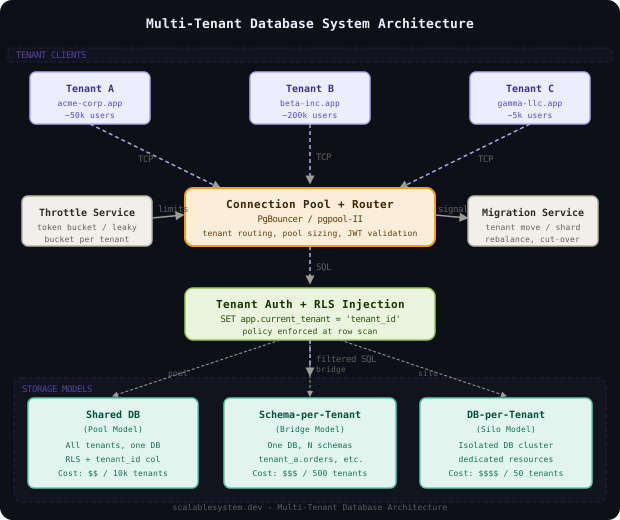
Data flows through the system like this: an application request arrives tagged with a tenant identifier (typically from a JWT or session). The tenant router validates the tenant exists, resolves which isolation shard or schema owns that tenant’s data, and routes the connection request to the appropriate pool. The connection pool manager enforces that this tenant cannot take more than its allocated connections. Once connected, row-level security policies enforce data isolation at the database engine level - even if application code has a bug, the engine won’t return another tenant’s rows.
The control plane operates asynchronously: it watches for migration jobs, schedules per-tenant backups, applies throttle policies as tenant behavior changes, and handles the migration of individual tenants between shards when capacity needs rebalancing.
Defense in depth is mandatory: RLS at the database engine level, tenant ID validation at the application layer, and connection-level pool isolation together create three independent barriers against cross-tenant data leakage - any one alone is insufficient.
Tenant Isolation Models
The tenant isolation model is the most consequential architectural decision in this system. Get it wrong and you’re either rebuilding the database layout or suffering constant noisy-neighbor incidents.
There are three canonical models: shared table (one table, tenant_id column on every row), schema-per-tenant (one PostgreSQL schema per tenant, shared database cluster), and database-per-tenant (one dedicated database cluster per tenant). Each sits at a different point on the cost-isolation tradeoff curve.
Think of these like office arrangements: shared table is an open-plan office where everyone is visible and audible to each other. Schema-per-tenant is private offices in a shared building - same HVAC and elevators, but separate rooms. Database-per-tenant is separate buildings entirely.
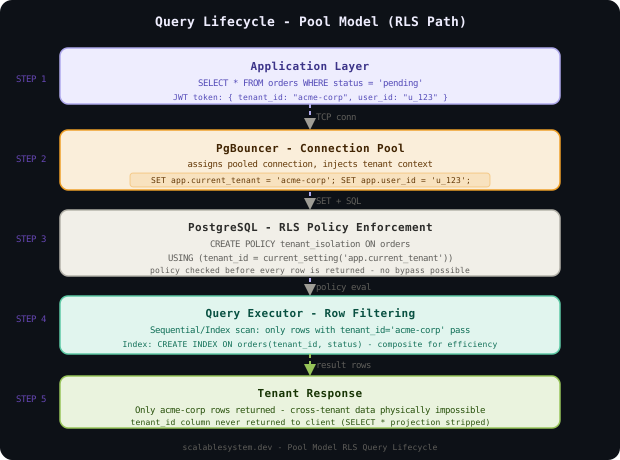
For most B2B SaaS products with 10,000 tenants, schema-per-tenant hits the right balance. Each tenant gets their own PostgreSQL schema (tenant_{id}.orders, tenant_{id}.users), which means:
- Indexes are per-tenant - a large tenant’s bloated index doesn’t affect a small tenant’s query plans
VACUUMandANALYZErun per-schema, so autovacuum on a write-heavy tenant doesn’t steal resources from reads on another- Tenant migration is a schema dump and restore, not a filtered export
- Backup is a
pg_dump --schema=tenant_{id}, producing a tenant-scoped recovery artifact
The downside is schema migration complexity: applying a ALTER TABLE ADD COLUMN across 10,000 schemas requires a coordinated migration runner. We’ll address this in the Data Model section.
PostgreSQL caps schemas per database around 10,000 before catalog bloat causes noticeable slowdowns in schema lookup. At large tenant counts, shard the tenant population across multiple database clusters (500-1,000 tenants per cluster), routing via the tenant registry.
The Connection Pool Manager
The connection pool manager is the throttle valve between the application tier and the database.
Without per-tenant connection limits, one misbehaving tenant can exhaust the connection pool. PostgreSQL’s connection limit is a hard cap - once reached, every new connection attempt blocks or fails. A tenant running 200 parallel queries can lock out all other tenants while waiting for slots.
The solution is per-tenant connection sub-pools layered on top of PgBouncer. Each tenant gets a maximum connection budget enforced at the pool manager level. When a tenant’s queries exceed their budget, new queries queue at the pool manager, not at the database.
# PgBouncer per-tenant pool configuration
[databases]
tenant_prod = host=db-shard-01 dbname=saas_prod

[pgbouncer]
pool_mode = transaction
max_client_conn = 10000
default_pool_size = 5
max_db_connections = 200
server_lifetime = 3600
server_idle_timeout = 600
# Per-tenant connection budget enforcement in the application proxy
class TenantConnectionPool:
def __init__(self, tenant_id: str, max_connections: int, dsn: str):
self.tenant_id = tenant_id
self.semaphore = asyncio.Semaphore(max_connections)
self._pool = None
self._dsn = dsn
async def acquire(self) -> asyncpg.Connection:
# Block here if tenant is at their connection limit
async with self.semaphore:
conn = await self._pool.acquire()
return conn
async def execute_with_rls(self, query: str, *args):
async with self.acquire() as conn:
# Set session variable for RLS enforcement
await conn.execute(
"SET app.current_tenant_id = $1", self.tenant_id
)
return await conn.fetch(query, *args)Notion routes all tenant database traffic through per-tenant connection pools sized by plan tier. Their free-tier tenants share a smaller pool budget while enterprise customers get dedicated pool allocations, ensuring a viral free-tier spike doesn’t degrade paid customers.
Row-Level Security
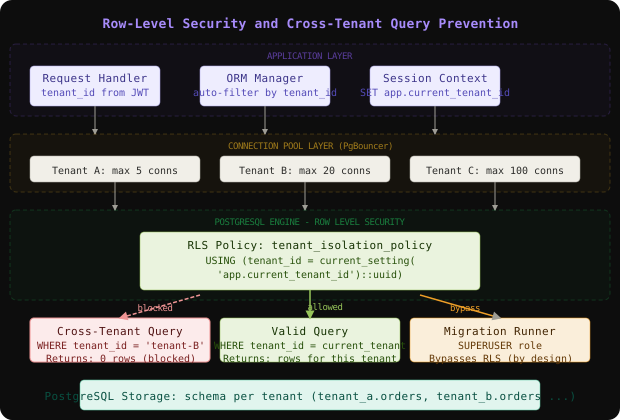
Row-level security (RLS) is the last line of defense against cross-tenant data leakage. Even if the application layer has a bug - a missing WHERE tenant_id = ? clause, an ORM misconfiguration, a raw SQL injection - PostgreSQL’s RLS engine will refuse to return rows belonging to another tenant.
The setup is straightforward but the details matter enormously. RLS policies are attached to tables and evaluated for every query. They receive a session variable (app.current_tenant_id) set when the connection is handed to the application.
-- Enable RLS on every tenant-scoped table
ALTER TABLE orders ENABLE ROW LEVEL SECURITY;
ALTER TABLE orders FORCE ROW LEVEL SECURITY;

-- Create a SELECT policy that restricts rows to current tenant
CREATE POLICY tenant_isolation_policy ON orders
  FOR ALL
  USING (tenant_id = current_setting('app.current_tenant_id')::uuid);

-- Create a superuser bypass role for migration tooling
CREATE ROLE migration_runner SUPERUSER;
GRANT migration_runner TO migration_user;
-- Superuser bypasses RLS automatically - use for schema migrations only

-- Application role cannot bypass RLS
CREATE ROLE app_user;
GRANT SELECT, INSERT, UPDATE, DELETE ON orders TO app_user;
-- Verify isolation: this query should return zero rows for a different tenant
SET app.current_tenant_id = 'tenant-a-uuid';
-- Now attempt to read tenant-b's data (will return empty, not error)
SELECT * FROM orders WHERE tenant_id = 'tenant-b-uuid';
-- Returns: 0 rows (RLS silently filtered it)FORCE ROW LEVEL SECURITY is critical - without it, the table owner can bypass policies. The application database user must be a non-owner role that cannot disable RLS.
RLS policies use current_setting() rather than a join to a session table because current_setting is evaluated at row-comparison time with zero overhead, while a join would add a subquery to every single query in the system.
Per-Tenant Throttling
Per-tenant throttling prevents a single high-volume tenant from monopolizing database CPU, I/O, or connection slots. This is the noisy-neighbor problem made concrete.
PostgreSQL itself doesn’t have built-in per-tenant resource limits (unlike some managed services). We implement throttling at two levels: connection-level (the semaphore in TenantConnectionPool above) and query-level via statement timeouts and work memory limits set at session startup.
# Apply per-tenant resource limits at session initialization
TENANT_RESOURCE_PLANS = {
    "free":       {"statement_timeout": "5s",  "work_mem": "4MB",  "max_conns": 2},
    "starter":    {"statement_timeout": "30s", "work_mem": "16MB", "max_conns": 5},
    "growth":     {"statement_timeout": "60s", "work_mem": "64MB", "max_conns": 20},
    "enterprise": {"statement_timeout": "300s","work_mem": "256MB","max_conns": 100},
}

async def configure_session(conn: asyncpg.Connection, tenant: Tenant):
    plan = TENANT_RESOURCE_PLANS[tenant.plan]
    await conn.execute(f"""
        SET statement_timeout = '{plan['statement_timeout']}';
        SET work_mem = '{plan['work_mem']}';
        SET app.current_tenant_id = '{tenant.id}';
    """)
For real-time throttling based on observed load (not just plan tier), we add a query rate limiter that tracks queries-per-second per tenant in Redis and applies a sliding window rate limit at the connection proxy layer.
# Sliding window rate limiter using Redis sorted sets
class TenantQueryRateLimiter:
    def __init__(self, redis: Redis, window_seconds: int = 10):
        self.redis = redis
        self.window = window_seconds

    async def allow(self, tenant_id: str, limit: int) -> bool:
        now = time.time()
        key = f"rl:queries:{tenant_id}"
        async with self.redis.pipeline() as pipe:
            pipe.zremrangebyscore(key, 0, now - self.window)
            pipe.zadd(key, {str(now): now})
            pipe.zcard(key)
            pipe.expire(key, self.window * 2)
            _, _, count, _ = await pipe.execute()
return count <= limitStatement timeouts that kill long-running queries mid-execution leave partial writes if not inside a transaction. Always set statement_timeout in combination with advisory locks or idempotent retry logic so that killed queries don’t leave the tenant’s data in a half-written state.
Tenant Migration Strategy
Migrating a tenant from one shard to another - for rebalancing, for giving a large tenant dedicated infrastructure, or for data residency compliance - is one of the most operationally complex operations in a multi-tenant system.
Think of it like moving an apartment tenant to a different building while they’re actively living there. You can’t just lock them out, move everything, and hand over a new key - you have to run both locations simultaneously during the switchover.
The migration protocol has four phases:
Phase 1: Snapshot and replicate. Export the tenant’s schema and data to the target shard. For a 100GB tenant this takes 30-90 minutes. During this time, writes continue on the source shard.
Phase 2: Catch-up replication. Use logical replication (PostgreSQL’s PUBLICATION/SUBSCRIPTION) to stream changes that occurred during the snapshot. The subscription applies them to the target in order.
Phase 3: Cutover. Once replication lag drops below 1 second, acquire a brief write lock (under 100ms), let replication drain completely, update the tenant registry to point to the new shard, and release the lock. New writes go to the target immediately.
Phase 4: Cleanup. Verify the target has all data, then drop the source tenant schema after a configurable retention window (typically 48 hours).
# Orchestrating tenant migration with logical replication
class TenantMigrator:
    async def migrate(self, tenant_id: str, source_dsn: str, target_dsn: str):
        # Phase 1: schema + data snapshot
        await self._snapshot_schema(tenant_id, source_dsn, target_dsn)

        # Phase 2: set up replication slot for catch-up
        slot_name = f"migrate_{tenant_id.replace('-', '_')}"
        await self._create_replication_subscription(
            slot_name, source_dsn, target_dsn, tenant_id
        )

        # Phase 3: wait for lag < 1s, then cutover
        while True:
            lag = await self._replication_lag_seconds(slot_name, target_dsn)
            if lag < 1.0:
                break
            await asyncio.sleep(0.5)

        async with self._write_lock(tenant_id):
            await self._wait_replication_zero(slot_name, target_dsn)
            await self._update_tenant_registry(tenant_id, target_dsn)

        # Phase 4: cleanup (deferred)
await self._schedule_source_cleanup(tenant_id, source_dsn, delay_hours=48)Shopify migrates shops between database shards using exactly this pattern - snapshot plus logical replication catch-up - and reports typical cutover windows of under 200ms for shops that are active during the migration. They call this “live migration” and it’s fundamental to their ability to rebalance shards without maintenance windows.
Data Model
The core schema has two tiers: system tables (tenant registry, migration state, throttle policies) that live in a dedicated system schema, and tenant tables (application data) that live in tenant_{id} schemas.
-- System schema: tenant registry and shard routing
CREATE TABLE system.tenants (
  id UUID PRIMARY KEY DEFAULT gen_random_uuid(),
  slug VARCHAR(100) UNIQUE NOT NULL,
  plan VARCHAR(20) NOT NULL DEFAULT 'free',
  shard_id INTEGER NOT NULL REFERENCES system.shards(id),
  schema_name VARCHAR(100) NOT NULL GENERATED ALWAYS AS ('tenant_' || replace(id::text, '-', '_')) STORED,
  created_at TIMESTAMPTZ NOT NULL DEFAULT now(),
  migrating_to_shard_id INTEGER REFERENCES system.shards(id),
  migration_started_at TIMESTAMPTZ,
  is_active BOOLEAN NOT NULL DEFAULT true
);

CREATE INDEX ON system.tenants(shard_id);
CREATE INDEX ON system.tenants(slug);

-- Shard registry: connection DSNs per shard
CREATE TABLE system.shards (
  id SERIAL PRIMARY KEY,
  dsn_primary TEXT NOT NULL,
  dsn_replica TEXT,
  max_tenant_count INTEGER NOT NULL DEFAULT 500,
  current_tenant_count INTEGER NOT NULL DEFAULT 0,
  region VARCHAR(50) NOT NULL,
  is_accepting_tenants BOOLEAN NOT NULL DEFAULT true
);

-- Per-tenant schema template (applied when new tenant is provisioned)
-- This runs against the target shard after SET search_path = tenant_{id}
CREATE TABLE orders (
  id UUID PRIMARY KEY DEFAULT gen_random_uuid(),
  tenant_id UUID NOT NULL,  -- denormalized for RLS policy
  customer_id UUID NOT NULL,
  total_cents BIGINT NOT NULL,
  status VARCHAR(30) NOT NULL DEFAULT 'pending',
  created_at TIMESTAMPTZ NOT NULL DEFAULT now(),
  CONSTRAINT fk_tenant CHECK (tenant_id = current_setting('app.current_tenant_id')::uuid)
);

ALTER TABLE orders ENABLE ROW LEVEL SECURITY;
ALTER TABLE orders FORCE ROW LEVEL SECURITY;

CREATE POLICY tenant_isolation_policy ON orders
  FOR ALL USING (tenant_id = current_setting('app.current_tenant_id')::uuid);

CREATE INDEX ON orders(customer_id, created_at DESC);
CREATE INDEX ON orders(status, created_at DESC) WHERE status IN ('pending', 'processing');
Partitioning key: The tenant_id column on every table is both the RLS enforcement column and the shard routing key. Within a schema, tables are partitioned by created_at for large tenants to keep index sizes manageable.
Schema migration strategy: When adding a new column across all tenants, a migration runner iterates through the tenant registry in batches, applying the DDL one schema at a time. Each schema migration is idempotent (checks information_schema.columns before applying) and runs concurrently across shards.
# Schema migration runner: apply DDL across all tenant schemas
class SchemaMigrationRunner:
    async def apply(self, migration_sql: str, batch_size: int = 50):
        tenants = await self.registry.list_all_active_tenants()
        errors = []

        for batch in chunked(tenants, batch_size):
            tasks = [
                self._apply_to_tenant(t, migration_sql)
                for t in batch
            ]
            results = await asyncio.gather(*tasks, return_exceptions=True)
            for tenant, result in zip(batch, results):
                if isinstance(result, Exception):
                    errors.append((tenant.id, str(result)))

        if errors:
            raise MigrationError(f"{len(errors)} tenants failed", errors)

    async def _apply_to_tenant(self, tenant: Tenant, sql: str):
        async with self.get_connection(tenant) as conn:
            await conn.execute(f"SET search_path = {tenant.schema_name}")
            # Idempotency check
            if await self._already_applied(conn, sql):
                return
            await conn.execute(sql)
            await self._record_migration(conn, sql)
Key Algorithms and Protocols
Tenant Routing with Consistent Hashing
The tenant registry maps tenant_id to a specific shard. Under normal operations this is a simple lookup. But during migrations, the same tenant_id temporarily resolves to two shards (source and target), and the router must use the registry state to decide which to use.
# Tenant router with migration-aware routing
class TenantRouter:
    def __init__(self, registry_cache: Redis, registry_db: asyncpg.Pool):
        self.cache = registry_cache
        self.db = registry_db

    async def resolve(self, tenant_id: str) -> ShardConnection:
        cached = await self.cache.get(f"tenant:{tenant_id}:shard")
        if cached:
            return self._parse_shard(cached)

        row = await self.db.fetchrow(
            "SELECT shard_id, migrating_to_shard_id FROM system.tenants WHERE id = $1",
            tenant_id
        )
        if row is None:
            raise TenantNotFoundError(tenant_id)

        # During migration: writes go to target, reads from source until cutover
        shard_id = row['migrating_to_shard_id'] or row['shard_id']
        shard = await self._get_shard_dsn(shard_id)

        await self.cache.setex(f"tenant:{tenant_id}:shard", 60, shard.to_json())
return shardThe tenant registry cache TTL during migrations must be shorter than the cutover window. If a cached entry points to the old shard during cutover, requests will hit the old shard after the write lock is released. Set TTL to 5 seconds during active migrations and invalidate explicitly on cutover.
Cross-Tenant Query Prevention
Cross-tenant query prevention is not just about RLS - it starts at the ORM layer. A developer forgetting a WHERE tenant_id = ? clause should fail loudly in development before hitting production.
# Django ORM mixin that auto-injects tenant filter
class TenantScopedQuerySet(models.QuerySet):
    def get_queryset(self):
        qs = super().get_queryset()
        current_tenant = get_current_tenant()  # thread-local set per request
        if current_tenant is None:
            raise RuntimeError("Tenant context not set - unsafe query blocked")
        return qs.filter(tenant_id=current_tenant.id)

class TenantScopedManager(models.Manager):
    def get_queryset(self):
        return TenantScopedQuerySet(self.model, using=self._db)

class Order(models.Model):
    tenant_id = models.UUIDField(db_index=True)
    # ...

    objects = TenantScopedManager()
    unscoped = models.Manager()  # escape hatch for migration tooling only
Scaling and Performance
The system scales along two axes: tenant count (handled by adding shards to the registry) and per-tenant load (handled by promoting busy tenants to dedicated infrastructure or giving them larger connection budgets).
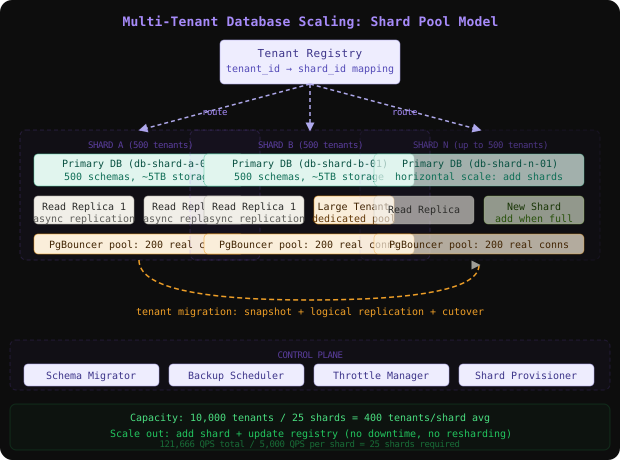
Capacity estimation for 10,000 tenants:

Given:
  - 10,000 tenants
  - Average 500 queries/minute per tenant
  - 80% small tenants: avg 5MB data, 100 queries/min
  - 15% medium tenants: avg 10GB data, 1,000 queries/min
  - 5% large tenants: avg 100GB data, 10,000 queries/min

Total queries/second:
  - Small: 8,000 * 100/60 = 13,333 QPS
  - Medium: 1,500 * 1,000/60 = 25,000 QPS
  - Large: 500 * 10,000/60 = 83,333 QPS
  - Total: ~121,666 QPS

Database shards needed:
  - Each shard handles ~5,000 QPS (safe limit for OLTP)
  - Required shards: 121,666 / 5,000 = ~25 shards

Storage:
  - Small: 8,000 * 5MB = 40GB
  - Medium: 1,500 * 10GB = 15TB
  - Large: 500 * 100GB = 50TB
  - Total: ~65TB across all shards

Connection budget:
  - 10,000 tenants * average 3 connections = 30,000 connections
  - PgBouncer pool: 200 real connections per shard * 25 shards = 5,000 real DB connections
The read replica strategy adds a replica per shard for read-heavy tenants. The tenant router directs SELECT queries to replicas and writes to primaries, with tenant-level configuration controlling which workloads can tolerate replica lag.
Salesforce’s multi-tenant architecture uses a “pod” model where each pod is an isolated database cluster serving roughly 5,000 organizations. When an org grows beyond pod capacity, they migrate it to a dedicated pod - the same tenant migration pattern described here, at Salesforce’s operational scale.
Failure Modes and Recovery
| Failure | Detection | Impact | Recovery |
|---|---|---|---|
| Single shard primary crash | Health check failover, replication lag alert | All tenants on that shard see connection errors for 30-60s during failover | Replica promoted automatically; connection pool drains and reconnects |
| Connection pool exhaustion | Pool manager queue depth metric | New queries queue; P99 latency spikes for affected tenants | Per-tenant semaphore prevents cascade; auto-scale application tier |
| Runaway tenant query | statement_timeout fires | Single tenant’s query killed; other tenants unaffected | Exponential backoff in tenant’s client; alert sent to account team |
| Shard disk full | Storage utilization alert at 80% | Write queries fail for all tenants on that shard | Migrate large tenants to other shards; expand shard volume |
| RLS policy misconfiguration | RLS audit query returns cross-tenant rows | Potential data leakage between tenants | Immediate rollback of policy change; audit log review |
| Tenant schema migration failure | Migration runner exception log | Affected tenant’s schema out of sync with other tenants | Idempotent migration re-run; manual schema inspection for failed tenants |
The most common operational mistake is running schema migrations without idempotency checks. A migration that fails halfway through a 10,000-tenant run and is re-run from the beginning will attempt to add columns that already exist on 5,000 schemas, filling logs with errors and making it impossible to distinguish truly failed migrations from already-applied ones.
Comparison of Approaches
| Approach | Isolation | Operational Cost | Noisy Neighbor Risk | Migration Complexity | Best Fit |
|---|---|---|---|---|---|
| Shared table + RLS | Medium (engine-level) | Low | High (shared indexes) | Trivial (filter by tenant_id) | Early-stage SaaS, under 1,000 tenants |
| Schema-per-tenant | High (schema-level) | Medium | Low (separate indexes) | Medium (schema export/import) | B2B SaaS, 1,000-20,000 tenants |
| Database-per-tenant | Maximum (cluster-level) | Very High | None | Complex (cluster migration) | Enterprise with compliance needs |
| Shard pools (hybrid) | High + physical separation | High | Low per shard | Medium (shard-level migration) | Large-scale SaaS, 10,000+ tenants |
| Kubernetes namespace per tenant | Medium (infra-level) | Very High | Varies | Complex | Platform-as-a-Service providers |
Schema-per-tenant on a shard pool model is the right choice for a B2B SaaS at 10,000 tenants. It provides strong isolation at a reasonable operational cost, makes per-tenant operations (backup, migration, throttling) straightforward, and allows you to promote heavy tenants to dedicated clusters without changing the application model.
Key Takeaways
- Tenant isolation is defense in depth: RLS at the database engine,
tenant_idfiltering at the ORM, and per-tenant connection pools together create overlapping barriers - relying on any single layer is unsafe. - Schema-per-tenant hits the B2B SaaS sweet spot: better isolation than shared tables with a fraction of the operational cost of database-per-tenant, scaling comfortably to tens of thousands of tenants.
- Connection pools are the throttle valve: without per-tenant connection budgets, one runaway tenant can exhaust the entire pool and deny service to everyone else.
FORCE ROW LEVEL SECURITYis non-negotiable: without it, the table owner role can bypass policies, and your application user role may have owner-equivalent permissions without your knowing it.- Tenant migration is a four-phase protocol: snapshot, replicate, cutover, cleanup - the cutover must be atomic and under 200ms to be transparent to the migrating tenant’s users.
- Schema migrations need idempotency: with 10,000 schemas to update, partial failures are inevitable - every migration must be re-runnable safely.
- The tenant registry cache TTL is a correctness parameter: during active migrations, a stale cached shard pointer means writes go to the wrong place - treat this cache like a consistency boundary, not a performance cache.
The counter-intuitive lesson here is that adding more isolation boundaries (RLS, connection pools, shard routing) actually simplifies your operational runbook. When something goes wrong, you know exactly which tenant is affected and can take surgical action on them - backup, migrate, throttle, or isolate - without touching anyone else. The overhead of those boundaries pays for itself in reduced blast radius.
Frequently Asked Questions
Q: Why not use a single tenant_id column and skip schemas entirely?
A: The shared-table model is simpler to start with but has critical weaknesses at scale. Indexes grow proportional to total rows across all tenants, not just one tenant’s rows - so a large tenant bloating the orders table makes index scans slower for small tenants too. VACUUM runs across all tenant rows. Per-tenant backup requires a filtered export. Schema migration is a single ALTER TABLE touching all rows simultaneously. Schema-per-tenant avoids all of these by giving each tenant independent storage objects.
Q: Why not just use database-per-tenant if isolation is so important? A: At 10,000 tenants, database-per-tenant means 10,000 PostgreSQL clusters to operate: 10,000 connection pools to configure, 10,000 backup schedules, 10,000 upgrade operations per minor version. Provisioning a new tenant takes 45+ seconds for cluster startup versus milliseconds for schema creation. The operational burden is prohibitive unless you’re running a platform where customers are paying for dedicated infrastructure (which changes the pricing model entirely).
Q: How do you handle a tenant that needs a custom schema (additional columns)?
A: Carefully. Custom columns can be handled in two ways: a custom_fields JSONB column on every table (flexible, no migration cost, but no indexing on custom fields), or a full schema fork where that tenant’s schema diverges from the canonical template. The latter is operationally dangerous because that tenant can no longer receive global schema migrations automatically - you need a custom migration track per tenant.
Q: What happens when a tenant’s data spans multiple shards? A: In the schema-per-tenant model, a single tenant’s data always lives on exactly one shard. Shards hold multiple tenants, but a tenant never straddles shards. This is by design - cross-shard joins are impossible, so tenant data must be atomic. If a tenant grows too large for a shard, you migrate the entire tenant to a larger shard or a dedicated cluster.
Q: How do you prevent a developer from accidentally calling Order.unscoped.all() in production?
A: Beyond code review, add a static analysis lint rule that flags any call to the unscoped manager outside of migration scripts and admin tooling directories. In CI, reject PRs where application code references the unscoped manager. At runtime, the unscoped manager’s connection role can require a specific database session variable to be set (a “super session” flag) that is only set by migration tooling, not by the normal request handling middleware.
Interview Questions
Q: Walk me through how you’d design the isolation model for a B2B SaaS with 5,000 enterprise customers.
Expected depth: Candidate should cover the three isolation models (shared table, schema-per-tenant, database-per-tenant), explain why schema-per-tenant is appropriate here, discuss PostgreSQL’s search_path for schema routing, RLS as a defense layer, and connection pool isolation. Strong candidates discuss the tradeoff between isolation strength and operational overhead.
Q: A single tenant is causing P99 latency to spike for all other tenants on their shard. How do you detect it and what do you do?
Expected depth: Detection via pg_stat_activity - queries sorted by duration with tenant context, or by instrumenting the connection pool layer with per-tenant QPS and latency metrics. Mitigation: kill the tenant’s runaway query via pg_cancel_backend, apply a stricter statement_timeout for that tenant’s sessions, or migrate them to a dedicated shard. Long-term: rate limiting at the connection proxy, per-tenant resource plans.
Q: How do you migrate a 200GB tenant from one shard to another with under 30 seconds of write downtime?
Expected depth: Four-phase protocol: schema snapshot with pg_dump --schema, set up logical replication subscription to stream ongoing changes, wait for replication lag to drop below 1 second, acquire write lock, flush remaining replication, update tenant registry atomically, release lock. Discuss replication slot setup, monitoring lag, the cutover lock mechanism, and post-migration validation.
Q: How does row-level security interact with database-level roles and the risk of policy bypass?
Expected depth: RLS policies are bypassed by superusers and table owners by default. FORCE ROW LEVEL SECURITY applies policies even to the table owner. Application code must connect as a non-owner, non-superuser role. Migration tooling connects as a separate role with explicit RLS bypass permissions. Candidate should know BYPASSRLS privilege and why granting it to the application role would negate all isolation.
Premium Content
Unlock the full article along with everything else in the archive — all in one place.